Creative Potential of Vector Graphics for Architectural Glass Projects
Transform digital images into highly original laminated glass designs of virtually any size or scale
Sponsored by Forms+Surfaces
This CE Center article is no longer eligible for receiving credits.
Architectural laminated glass has become a favored material for indoor and outdoor projects, in large part due to its beauty, durability, functionality, and remarkable design versatility. Increasingly, photography and other digital images are popular choices for incorporating design elements into the glass. However, it can be difficult for designers to find and source imagery of an appropriate size for their projects, especially large-scale applications.
Photo courtesy of Forms+Surfaces
New online design tools that use vector graphics help solve this problem and give designers the ability to bring virtually any digital image or photo to architectural laminated-glass applications of any size or scale.
This course introduces participants to how vector graphics are used in architectural design by exploring where, why, and how they are incorporated into a variety of materials, manufacturing processes, and applications. Next, it explains what vector graphics are and how they differ from raster images. The course then examines in detail how vector graphics are used in architectural laminated glass. It concludes with real-world project examples.
To begin, it will help to understand a few vector basics.
Vector Graphics in Architecture
A “vector” graphic or image refers to a specific type of digital file format. Because they are made from a series of mathematical curves, vector graphics are infinitely scalable. This means they retain their visual integrity regardless of output size or scale. For example, a vector logo created at business-card size can be successfully enlarged for a billboard without sacrificing image quality, or vice versa.
The beauty of vector graphics lies in this infinite scalability. Regardless of output size, application, or viewing distance, the precision of vector graphics ensures clean, crisp detailing and high-quality end results. This makes them an ideal format for drawings, typefaces, logos, patterns, and other design elements that benefit from unhindered size/scale flexibility.
Vector-graphic files can be output through a variety of processes (like printing) and used with a wide range of media. Vector files can also be used to drive automated tooling that produces imagery, shapes, and patterns in, on, or for different materials and architectural applications.
Vector graphics are routinely incorporated into architectural design in many different ways. Following are a few common examples.
Vinyl Signage
Since scale is not an issue with vector graphics, large-scale vector images can be printed directly onto vinyl sheets for use as high-impact signs and banners that communicate wayfinding, branding, and promotional information.
Vector files can also drive vinyl die-cutting equipment. Letters, patterns, and shapes cut from sheets of adhesive-backed vinyl and adhered to windows or walls are routinely used to bring personality to retail storefronts, identify or define spaces, and label exhibits and displays.
Perforated Metal
Perforated metal is frequently seen in indoor and outdoor settings. Perforated designs on partition walls, railing infill panels, benches, chairs, and directional lighting shields are just a few examples.
Vector files enter into the perforation equation on many fronts. Used with automated punch tools or lasers to puncture metal, they ensure precise lines, smooth arcs, and consistent spacing between perforations. They can create complex punch files that produce fairly intricate perforated designs. Vector files also mean perforation patterns can be efficiently automated and repeated at any scale.
All images and videos courtesy of Forms+Surfaces
Vector files can be used to create designs in etched and perforated metal—in this case, stainless steel—to make statements of any scale, indoors or out.
Etched Metal
Etching is another method of bringing patterns and imagery to metal surfaces. Designs are applied to the metal by “masking” (covering) the areas in which a design will appear, then etching around the mask. The masked portions retain the original metal finish, while the etched areas display a contrasting surface appearance.
Vector files are often involved in creating etching masks. Sometimes they are used to generate masks that are directly applied to the metal surface with inks or other substances—an approach that produces distinct, smooth edges around the etched areas.
In other cases, masks are die-cut or hand-cut from vinyl sheets. When vector files drive the die-cutting equipment, the vinyl edges—and resulting etched design—tend to be crisper than those produced with hand-cut vinyl.
Regardless of mask type, once the mask is positioned, the metal is etched, typically by one of two processes. Acid etching is a traditional method that requires the use of acids and other corrosive chemicals to etch the unmasked metal. Bead blasting is a more environmentally friendly option that uses a photolithographic bead-blasting system instead of harmful acids or chemicals to achieve the final etched design.
Etched Glass
Etching is also used to bring patterns and designs to architectural glass. The process is similar to metal etching: a mask produced through one of several methods—with or without the use of vector graphics—is used to designate areas of a design that will not be etched. As with metal, the more precise the mask (i.e., those created with vector files), the more precise the end result.
As with metal etching, once the mask is in place, the glass is etched through one of two methods: chemically or by sandblasting. Regardless of which method is used, the masked portions retain the original glass finish, and the etched areas have a different look and feel.
Branded Glass
Many techniques can be used to bring branding elements to architectural glass. As described elsewhere in this course, vector files might drive cutting equipment for vinyl graphics that will adhere to windows or glass walls. They might be used to incorporate brand designs in etched glass, or they may be output as brand-aligned graphics for laminated-glass interlayers.
In addition to logos—a common use for vector graphics in branding packages—their infinite scalability makes them ideal for typefaces, patterns, and other identity components that benefit from unhindered size/scale flexibility, which is perfect for taking brand messaging across glass applications of any size or scale.
Laminated Glass
Laminated glass is a versatile material when it comes to incorporating colors, graphics, and other project-specific artwork. Laminated glass is typically constructed of two or more glass lites, between which one or more decorative interlayers are sandwiched. The interlayers serve as the “canvas” for a wide range of decorative treatments, including vector graphics.
Because laminated glass is frequently used in large-scale glass applications, the scalability of vector graphics gives designers virtually unlimited ways to create design statements in glass for spaces of all kinds.
Vector graphics can make an artistic statement at any size or scale. Precise vector output ensures high-quality end results.
Architectural laminated glass has become a favored material for indoor and outdoor projects, in large part due to its beauty, durability, functionality, and remarkable design versatility. Increasingly, photography and other digital images are popular choices for incorporating design elements into the glass. However, it can be difficult for designers to find and source imagery of an appropriate size for their projects, especially large-scale applications.
Photo courtesy of Forms+Surfaces
New online design tools that use vector graphics help solve this problem and give designers the ability to bring virtually any digital image or photo to architectural laminated-glass applications of any size or scale.
This course introduces participants to how vector graphics are used in architectural design by exploring where, why, and how they are incorporated into a variety of materials, manufacturing processes, and applications. Next, it explains what vector graphics are and how they differ from raster images. The course then examines in detail how vector graphics are used in architectural laminated glass. It concludes with real-world project examples.
To begin, it will help to understand a few vector basics.
Vector Graphics in Architecture
A “vector” graphic or image refers to a specific type of digital file format. Because they are made from a series of mathematical curves, vector graphics are infinitely scalable. This means they retain their visual integrity regardless of output size or scale. For example, a vector logo created at business-card size can be successfully enlarged for a billboard without sacrificing image quality, or vice versa.
The beauty of vector graphics lies in this infinite scalability. Regardless of output size, application, or viewing distance, the precision of vector graphics ensures clean, crisp detailing and high-quality end results. This makes them an ideal format for drawings, typefaces, logos, patterns, and other design elements that benefit from unhindered size/scale flexibility.
Vector-graphic files can be output through a variety of processes (like printing) and used with a wide range of media. Vector files can also be used to drive automated tooling that produces imagery, shapes, and patterns in, on, or for different materials and architectural applications.
Vector graphics are routinely incorporated into architectural design in many different ways. Following are a few common examples.
Vinyl Signage
Since scale is not an issue with vector graphics, large-scale vector images can be printed directly onto vinyl sheets for use as high-impact signs and banners that communicate wayfinding, branding, and promotional information.
Vector files can also drive vinyl die-cutting equipment. Letters, patterns, and shapes cut from sheets of adhesive-backed vinyl and adhered to windows or walls are routinely used to bring personality to retail storefronts, identify or define spaces, and label exhibits and displays.
Perforated Metal
Perforated metal is frequently seen in indoor and outdoor settings. Perforated designs on partition walls, railing infill panels, benches, chairs, and directional lighting shields are just a few examples.
Vector files enter into the perforation equation on many fronts. Used with automated punch tools or lasers to puncture metal, they ensure precise lines, smooth arcs, and consistent spacing between perforations. They can create complex punch files that produce fairly intricate perforated designs. Vector files also mean perforation patterns can be efficiently automated and repeated at any scale.
All images and videos courtesy of Forms+Surfaces
Vector files can be used to create designs in etched and perforated metal—in this case, stainless steel—to make statements of any scale, indoors or out.
Etched Metal
Etching is another method of bringing patterns and imagery to metal surfaces. Designs are applied to the metal by “masking” (covering) the areas in which a design will appear, then etching around the mask. The masked portions retain the original metal finish, while the etched areas display a contrasting surface appearance.
Vector files are often involved in creating etching masks. Sometimes they are used to generate masks that are directly applied to the metal surface with inks or other substances—an approach that produces distinct, smooth edges around the etched areas.
In other cases, masks are die-cut or hand-cut from vinyl sheets. When vector files drive the die-cutting equipment, the vinyl edges—and resulting etched design—tend to be crisper than those produced with hand-cut vinyl.
Regardless of mask type, once the mask is positioned, the metal is etched, typically by one of two processes. Acid etching is a traditional method that requires the use of acids and other corrosive chemicals to etch the unmasked metal. Bead blasting is a more environmentally friendly option that uses a photolithographic bead-blasting system instead of harmful acids or chemicals to achieve the final etched design.
Etched Glass
Etching is also used to bring patterns and designs to architectural glass. The process is similar to metal etching: a mask produced through one of several methods—with or without the use of vector graphics—is used to designate areas of a design that will not be etched. As with metal, the more precise the mask (i.e., those created with vector files), the more precise the end result.
As with metal etching, once the mask is in place, the glass is etched through one of two methods: chemically or by sandblasting. Regardless of which method is used, the masked portions retain the original glass finish, and the etched areas have a different look and feel.
Branded Glass
Many techniques can be used to bring branding elements to architectural glass. As described elsewhere in this course, vector files might drive cutting equipment for vinyl graphics that will adhere to windows or glass walls. They might be used to incorporate brand designs in etched glass, or they may be output as brand-aligned graphics for laminated-glass interlayers.
In addition to logos—a common use for vector graphics in branding packages—their infinite scalability makes them ideal for typefaces, patterns, and other identity components that benefit from unhindered size/scale flexibility, which is perfect for taking brand messaging across glass applications of any size or scale.
Laminated Glass
Laminated glass is a versatile material when it comes to incorporating colors, graphics, and other project-specific artwork. Laminated glass is typically constructed of two or more glass lites, between which one or more decorative interlayers are sandwiched. The interlayers serve as the “canvas” for a wide range of decorative treatments, including vector graphics.
Because laminated glass is frequently used in large-scale glass applications, the scalability of vector graphics gives designers virtually unlimited ways to create design statements in glass for spaces of all kinds.
Vector graphics can make an artistic statement at any size or scale. Precise vector output ensures high-quality end results.
An In-Depth Look at Vector Graphics
Because their potential is vast, it’s worth examining vector graphics in greater detail.
One of the key things to understand about vector graphics is how they differ from raster images. Before getting into the details, let’s start with some basic terminology.
Key Terminology
Raster (or bitmap) graphics are made up of tiny squares called pixels. Once a raster graphic is created at a certain size, meaning a fixed number of pixels, it cannot be scaled up without losing image quality. Digital photos are typically raster images.
A vector graphic is another type of digital image, but instead of pixels, it’s made of points and paths (lines between points) that are created through mathematical equations.
A pixel is the smallest addressable element in a display device. It is also a physical square in a raster image. Pixels are the smallest controllable elements of a picture represented on a display screen.
PPI stands for “pixels per inch” and is used to measure the resolution, or pixel density, of devices such as digital displays, image scanners, or digital-camera image sensors.
DPI stands for “dots per inch.” When used in reference to display screens, it is a measure of sharpness, or the density of illuminated points. When used in reference to printing, DPI refers to the measure of the printed image quality on paper, identifying the number of dots that can be placed within a 1-inch line.
Size refers to the number of pixels in an image along the width and height.
Resolution refers to the fineness of detail in an image and can be measured in PPI or DPI.
Vector Graphics
Vector graphics use mathematical equations to create infinitely scalable images by converting any graphic into points that are smoothly connected by lines and/or curves. These lines and curves are called “paths.” The paths are often filled in with color to make up the different shapes one sees in a vector graphic.
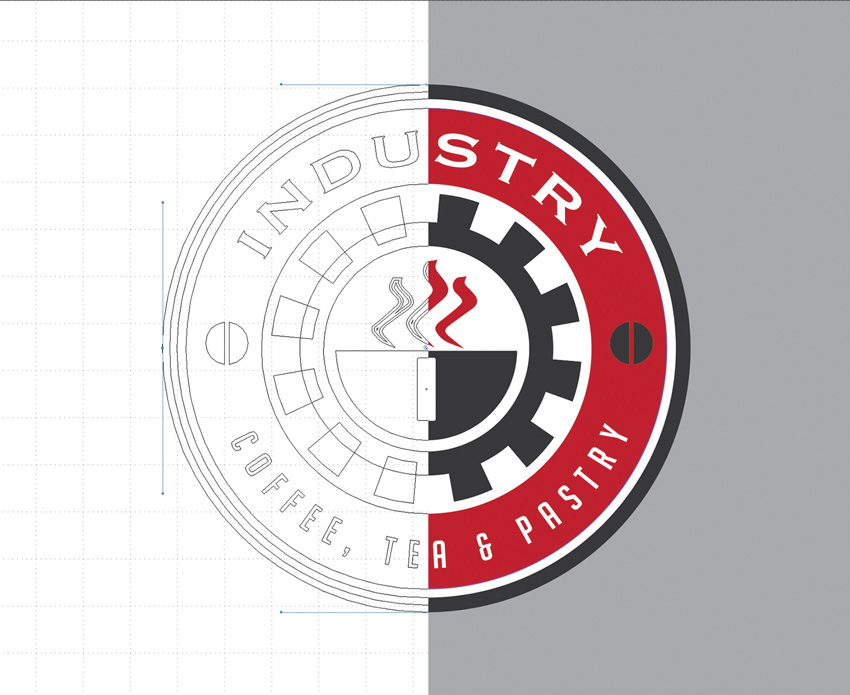
Vector graphics use mathematical equations to convert any graphic into points that are smoothly connected by lines and/or curves, also known as paths.
One of the main benefits of converting a graphic to path-connected points is that the resulting image can be infinitely scaled up or down without losing image quality or changing the file size.
Because of their scalability, vector graphics provide tremendous design flexibility. For example, if a company’s logo is created in a vector format, it can be used as small as a letterhead graphic or as large as a building feature wall.
Because file sizes do not change when vector graphics are scaled up or down, very large vector images retain a relatively small file size, which makes image processing, handling, and storage more manageable than with larger image file formats, including raster files.
This is not to say that vector graphics are always small files. File size is proportionally tied to the complexity of the vector image. A simple two-color logo might create a very small file, while the file for a process color illustration may be as large or larger than its corresponding raster image.
Commonly used vector formats are SVG, EPS, XML, and CGM.
Raster Images
Raster images are created from a finite number of tiny squares called pixels. Once a raster graphic is created at a certain size, meaning a fixed number of pixels, it cannot be scaled up without sacrificing image quality.
The greater the number of pixels in an image, the larger the file size, or resolution. While the two are positively correlated—a larger file size affords greater flexibility—the bottom line remains: raster graphics cannot be dramatically resized without compromising their resolution. If stretched to fit a space they were not designed to fill, their pixels become visibly grainy and the image distorts.
Because raster images are comprised of a finite number of pixels, increasing the image size also proportionally increases the pixel size. This results in degraded image resolution because the larger pixels are now more visible and contribute to the image looking blurry rather than crisp.
The use of raster images for large-scale design applications requires careful consideration. Both image size and resolution must be factored in to achieve optimal end results. This is critical for two reasons: 1) insufficient resolution can significantly compromise the quality of the end design; and 2) because large-scale raster images imply a large number of pixels and thus large file sizes, the images can be more difficult to process, handle, and store than alternate file formats, such as vector graphics.
To know whether a raster image can be used for an application, start by checking the pixel density. This density is measured in DPI or PPI. The PPI value is for digital displays of the image; the DPI value is for analog prints of the image. The PPI value is the same as the DPI value, but the terms should be properly applied based on the image display application.
For example: Web applications display images at 72 PPI and can look very crisp in that context. The Apple Retina display, however, is set at 227 PPI, so more modern technology would make this problematic. And even this DPI is still much too low for print applications, which require high-resolution raster files of around 300 DPI at actual output width and height.
Common raster file types are JPG, TIFF, PNG, GIF, and BMP.
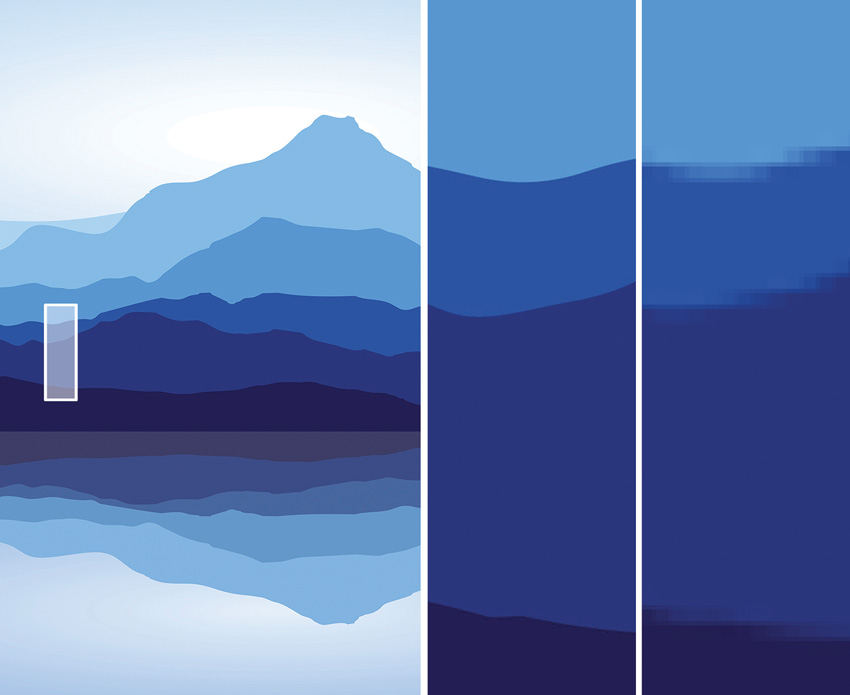
When resized, infinitely scalable vector graphics (close-up at left) can offer a clearer picture than raster images (close-up at right).
The Advantages of Vector Graphics over Raster Images
There are many reasons to use vector graphics instead of raster images.
As we’ve just seen, there are three main challenges with raster imagery:
Raster images cannot be resized without potentially sacrificing image quality or resolution.
Raster images appropriate for use in large-scale applications are often difficult to source because personal and online stock photos, and even professional photography to a certain extent, do not usually have the dimensional resolution suitable for large-scale designs.
Large, high-resolution raster images result in large file sizes that can be cumbersome to store, process, and produce.
By converting raster images to vector graphics, all of these challenges can be resolved:
Vector images can be infinitely scaled up or down without losing image quality.
Because vector graphics are flexible in terms of scaling, they can be customized for many different purposes, including large-scale projects and end uses. Again, while it is not uncommon to think of vector graphics largely for use in logos or branding elements, they have many potential applications.
Vector art is ideal for printing. Since the art is made from a series of mathematical curves, it will print or otherwise output very crisply even when resized.
When a vector image is scaled up to a larger size, the overall file size does not change. Large vector images can have a relatively small, easily managed file sizes.
Vector images are considerably more flexible than raster images and therefore much more beneficial in large-scale architectural applications.
That said, designers need to be aware that in converting raster images to vector graphics, the conversion process is more of a “translation,” and a vector graphic will never be a true one-to-one depiction of the original raster image.
Creating Vector Graphics
Vector graphics can be created in many different ways, each with their own benefits and challenges.
Vector Graphics Created from Scratch
Vector graphics can be created from scratch by using graphic design software such as Adobe Illustrator and/or Adobe Photoshop. An architectural firm might have the ability to do this in-house or may need to source an outside digital artist. It often depends on the firm and the complexity of the vector artwork required.
Simple vector designs can be created in Illustrator with drawing tools that give designers ample flexibility to produce deliverables that match a creative vision.
Complex vector illustrations often require expertise in both Photoshop and Illustrator—sometimes to a level that goes beyond the in-house capabilities of an architectural or design firm. Digital artists can be commissioned through outside services to meet these needs, but this adds time and costs to a project.
Raster Images Converted to Vector Graphics
Raster images can be converted to vector graphics by using a combination of Photoshop and Illustrator or similar graphics software. As mentioned, it is important to remember that this conversion process is more of a “translation;” a vector graphic will never be a true one-to-one depiction of the original raster image.
Before a raster image can be converted, it must be prepped through image editing software such as Photoshop. It can then be converted to a vector graphic in Illustrator. As much as Illustrator allows users to retouch raster images, Photoshop is far more advanced when it comes to preparing raster images for conversion, so users must work with both programs.
While Illustrator can provide high-quality finished vector artwork, it is not without limitations. Illustrator requires users to test various conversion and tracing settings to obtain optimal end results. Additional adjustments are also often needed—and entail significant back-and-forth with Photoshop—a factor that can be time consuming, require advanced experience with the software, and result in very large vector files, depending on the settings used.
Web Applications that Generate Vector Graphics
Web applications that generate vector graphics are a relatively new and growing option. Web apps may have less advanced features than some of their desktop software counterparts, but they can also provide plenty of advantages for registered users, including:
Affordability: Access to many web apps and design tools is free.
Accessibility: A user’s designs and projects are consolidated all in one place; with an Internet connection, they are accessible from anywhere at any time.
Efficient storage: Design and storage happens on the cloud, without impact to a user’s own storage capabilities.
Expanded design freedom: Preset filters and libraries of visual effects enable users with limited knowledge of graphic design software to create and customize complex vector artwork.
Product-specific output: The output generated from web apps is often tied to a specific product or deliverable, making it easy to tailor designs for a chosen application; for example, digital displays, print artwork, or as a graphic interlayer in laminated glass.
With this knowledge of vector graphics, we can now look at their use in one material specifically: architectural laminated glass.
Vector Graphics in Laminated Glass
Let’s begin by answering a basic question: What is architectural laminated glass?
Laminated glass is a type of safety glass that holds together when shattered—the result of one or more interlayers, typically of polyvinyl butyral (PVB) or ethylene-vinyl acetate (EVA), sandwiched between two or more layers (lites) of glass. The interlayers and lites of glass are laminated under heat and pressure to create safety laminated glass.
Laminated glass can consist of two lites of transparent glass, or one lite of transparent glass and a reflective glass backer, depending on end use. The former is typically used when the glass will be seen from both sides, as with doors, partitions, and room dividers. The latter is used when the glass will be installed against a solid surface.
Laminated glass is comprised of one or more decorative interlayers laminated between two lites of glass.
From an aesthetic standpoint, laminated glass offers tremendous creative reach. Think of the interlayers between the glass lites as a blank canvas: colors, patterns, and other graphic imagery printed on one or more interlayers create visual excitement. Different glass finishes and translucency levels enhance the finished picture.
Across products and applications, laminated glass is a remarkably versatile material. It can be specified in sizes up to 60 inches by 120 inches. It can be incorporated into walls, columns, elevator interiors, backlit displays, and other architectural features. It can be used indoors and out.
Finally, laminated glass has many functional benefits: it is easy to clean and maintain, can address a wide range of light-transmission scenarios, and may help meet project sustainability goals. The use of ultraviolet-resistant inks in the printing process helps ensure that the interlayer colors and designs retain their integrity over time. And the laminated structure protects the interlayer artwork from surface damage and fading.
Against this backdrop, it is easy to see that laminated glass is versatile solution with many advantages.
In the next section, we’ll focus on one advantage in particular: its use with vector images as a way to creatively address the growing trend of bringing artwork to public spaces.
A Perfect Canvas for Vector Graphics
The use of artwork to enhance public spaces is on the rise. Increasingly central to the look and feel of a space, the right art in the right place can have a positive impact on a building’s visitors, tenants, and staff.
In line with this trend, the use of regional or setting-specific imagery has become especially prominent. Whether bringing nature indoors, interpreting local scenes, or defining the atmosphere of a place, photography and other localized artwork can tell a compelling story.
Laminated glass is a popular choice for showcasing these visual narratives. Among surfacing material options, one of its primary benefits is that it gives architects and designers the flexibility they need to simultaneously address both creative and functional concerns.
Unfortunately, finding photography and other artwork of an appropriate size and resolution for use in large-scale glass applications can be a frustrating pursuit. Personal and stock photos—typically raster images—are often too small to achieve favorable end results. Custom artwork can be time consuming and/or expensive to source and produce.
Enter vector graphics. Their infinite scalability makes them an ideal interlayer option for laminated-glass designs of any shape or size. They offer astounding artistic reach. And as the art within the glass, vector graphics invite the imagination to soar.
Bringing Vector Art to Glass
As discussed above, there are many options for creating vector graphics, each with its own opportunities and challenges.
While traditional programs such as Photoshop and Illustrator offer vast creative potential, technologies are constantly evolving. Designers can benefit from exploring the options.
New web-based design tools and apps expand the possibilities for creating vector files and by extension, bringing photography and other digital artwork to architectural projects and materials.
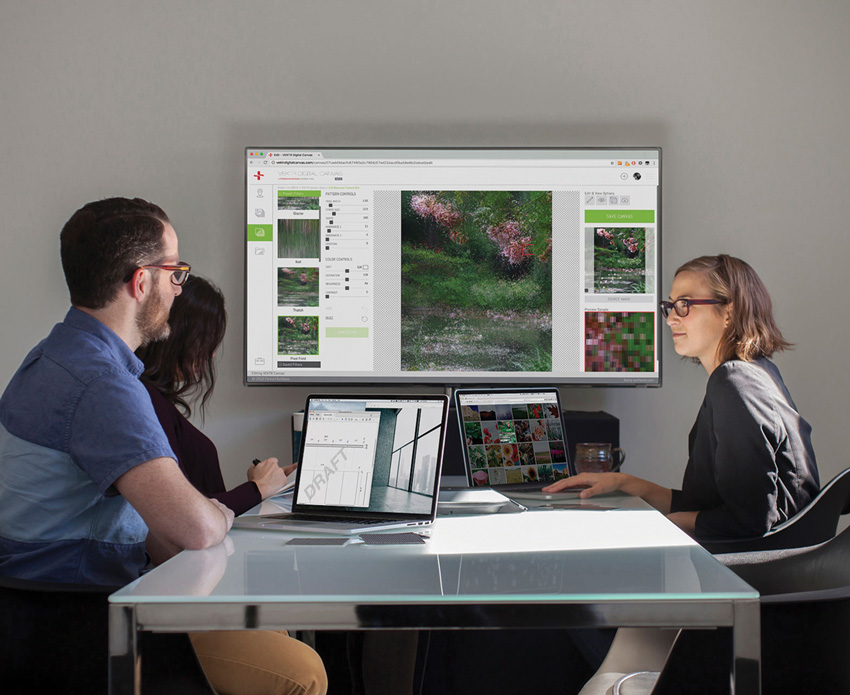
Web apps that put design control at a designer’s fingertips make it easy to explore ideas, collaborate with clients, share work, manage projects, and make decisions on the spot.
Among the tools available on the market today, at least one app enables users to convert raster images of any size from any source into highly customized vector designs of any size or scale. The vector designs are then output and used as the interlayers for the company’s laminated glass.
This tool typifies one of the capabilities described earlier: a web app that generates product-specific vector output that ties to a specific product or deliverable—in this case, laminated glass.
Web Apps Offer Exciting Options
Technically speaking, the app referenced above transforms raster images into infinitely scalable, highly customizable vector artwork. By eliminating the size/resolution constraints of raster images, it allows designers to use their own imagery—from any source—to create highly personalized vector designs.
This means that as inspiration strikes, designers can capture the shots they want with their smartphone or tablet. They can select images from their own image libraries, use client artwork, scan print literature or material swatches, choose low-resolution stock images, or draw from numerous other image sources—the choice is theirs. The app gives designers the freedom to maximize casual photos with client-, local-, or project-specific importance.
It also gives them complete creative control, without the need for separate programs such as Illustrator or Photoshop. After dragging a source image into the app workspace, users can experiment with filters and abstraction levels, customize colors, patterns and dimensions, visualize designs in 2-D and 3-D, download and save their work, create projects, and request budget pricing—all without leaving the app.
So, while powerful tools such as Photoshop and Illustrator exist, web apps are increasingly worth investigating. The bottom line: designers have many options for creating and using vector graphics to bring their design vision to laminated-glass applications of any size or scale.
In planning vector glass designs, a few final factors come into play.
Optimizing Perception
Laminated glass is impacted by inherent glass characteristics as well as surrounding conditions. Inherent glass characteristics include reflectivity, opacity, and saturation. Each can affect how the vector artwork used in the glass is perceived. For optimal end results, designers should consider these elements when creating their design and incorporating glass into a project.
Different glass finishes can affect the reflectivity of glass and potentially obscure the artwork. For example, light reflecting off of glass with a shiny finish can result in difficulty viewing the design. In glass with a less-reflective finish, reflections are not as prominent, so the artwork is clearer to the viewer.
Opacity is another factor. Glass that will be viewed from both sides, as in a room divider or door, will often be transparent, with graphics visible on both sides. However, glass that will be viewed from the front side only, with the back side against a wall or elevator interior, for example, will have an opaque backer to allow maximum visibility of the design.
Saturation comes into play as well. In instances where the glass is backlit or light transmits through it, for example, the colors of the interlayer artwork need to be more saturated than in panels that will not have light coming through. If different panels comprising a glass design will be viewed with and without light transmission, the different lighting conditions should be considered upfront to achieve a favorable end result.
Different light sources can also impact the perception of the glass and the artwork within.
Ambient, or general, lighting provides nondirectional illumination. Ambient lighting provides a comfortable level of brightness, ideally without glare. Ambient lighting can consist of a combination of different sources, such as lamps and natural lighting from windows.
Accent lighting highlights areas or features within a space that are intended as focal points, such as artwork, feature walls, or other design elements. Sources include lamps, recessed lighting, or hidden lights. Illuminated laminated glass typically falls within the accent-lighting category.
Task lighting refers to a light source that is dedicated to performing a specific task in a specific area of a space. Light sources can be fixed or moveable, depending on space and task. Examples include reading lamps and directional recessed lights.
Finally, because laminated glass is suitable for both interior and exterior applications, the artwork may be visible from both inside and outside a building, so the lighting of both environments should be considered. In addition to the interior-lighting scenarios described above, it is important to remember that architectural glass in outdoor applications has to account for streetlights, traffic and natural lighting, and other potential light sources that cannot be controlled.
Upfront evaluation of these conditions can help ensure that each vector design makes its intended visual impact—without compromise from ambient lighting or other lighting conditions.
Examples of Vector Graphics in Architectural Glass Projects
Following are several examples that illustrate the beauty of using vector graphics in laminated-glass applications. Because their infinite scalability addresses the size and resolution constraints of raster images, vector graphics give designers the freedom to customize artwork in endless ways to suit project-specific creative goals.
In addition, as described previously, new web technologies make working with vector graphics easier than ever.
One app in particular—referenced earlier and shown in the examples below—allows designers to use images of any size from any source to create highly original vector artwork, without relying on Photoshop, Illustrator, or similarly complex tools or the time and expertise they require. Further streamlining the design process, the vector artwork produced with the app is output as the interlayers in the company’s laminated glass.
Example 1: Bringing nature indoors can be as simple as capturing the desired shot with your smartphone or tablet.
With vector graphics, image sourcing is easy; you do not need professional or high-resolution photography to see nature’s beauty come alive in your projects. Whether starting with a specific view in mind or finding inspiration on the fly, you can maximize casual photos of any quality or size.
Working with vector graphics is easy too. Using the design tool shown here, you can just drag your digital image into the app, experiment with different filters, controls and effects, monitor your progress as you go, and continue refining your design until you achieve the end results you desire.
From landscapes to seascapes, wildlife, and more, vector graphics can help you bring the beauty of nature and the world around us to laminated-glass applications of any size or scale.
Example 2: Vector graphics that draw inspiration from regional content are a great way to create a sense of community with literal or abstract views of local landmarks, icons, or scenes.
In airports, for example, regional imagery can let passengers know where they have landed and welcome travelers returning home. In civic spaces, it might reflect a local identity or convey local pride. In culture centers and museums, it might allude to the thrill of adventure and discovery inherent to the area.
Consider using the app to interpret a single vector image in multiple ways for different facets of a project; using a single shot to make a bold, standalone statement; or populating a space with a variety of regional scenes.
If you are looking to source photos, low-resolution stock photography can be a great solution. Image options often abound, and the scalability of vector graphics makes it easy to match project dimensions. You can turn even the smallest scene into a sweeping panoramic vista.
Example 3: You might be inspired by the pulse of a city or skyline, or moved by seasonal shifts in the weather or a certain time of day. Vector graphics make it easy to capture these feelings with designs that evoke the atmosphere of a place.
Images sourced through social media sites and interpreted as vector graphics are another way to bring local color to laminated-glass applications. Use your own photo-sharing sites or draw from those of your client. Since image size is not an issue with vector graphics, small social-media-sized digital files are fine—and what better place to find images that align with a personal interest or point of view?
Bring your image into the app, and you are on your way to creatively transforming a season, moment, or scene. With vector graphics, it is easy to capture the beat in laminated-glass designs that transport viewers to another time and place.
Example 4: Vector graphics are a remarkably agile option for translating artwork with historical or cultural significance into laminated-glass applications of all shapes and sizes.
Even if you are starting with an old snapshot, a postcard, or an original work of art, you can simply scan or capture the piece, drag the digital file into the app, and begin to create.
Because the app converts raster images into vector graphics, you do not need to start with a perfect image. Remember, the conversion process is a translation: the vector graphic will not be a true one-to-one depiction of the original raster image. Which means that, by using the app’s filters and controls, you can take a seemingly imperfect image and turn it into something perfectly unique.
Picture the possibilities for bringing the past to the present, recognizing bygone eras, celebrating meaningful milestones, and honoring moments in time. Regardless of your source-image selection, vector graphics make it easy to keep memories and achievements alive.
Example 5: Vector graphics are an effective way to carry logos, colors, and other branding elements across a project.
For example, if you have an existing business-card logo, you can bring the digital file into the app and use it as your source image for creating impactful laminated-glass designs. The infinite scalability of vector graphics means you can match project dimensions and other application requirements even when starting with a very small file.
And, because patterns, colors, and dimensions are fully customizable through the app’s image-editing tools, there are countless ways to customize a design. Whether you take a literal approach or explore ways to make more of an abstract statement, vector graphics allow you to creatively translate a brand’s message and express the personality of a space.
Example 6: Visual merchandising is another way to creatively realize the potential of vector graphics in architectural laminated glass.
Because a wide range of visuals can serve as a starting point, personal photo libraries and mementos can be a useful resource. For example, you can turn a client’s shots of the merchandise itself into a source image. Draw on photos of items that support a brand’s look and feel—event memorabilia, sports team logos, or corporate identity graphics might come into play. You can also customize other imagery with project-specific importance to communicate a brand’s unique sense of style.
Likewise, explore different image treatments and effects to create just the right look. Use the app’s filters and controls to quickly work through ideas, modify designs, keep pace with changing client preferences, match or complement other colors and textures, or interpret the same source image in multiple ways for use in different areas on a project.
Example 7: Vector graphics are a surprisingly versatile way to create cohesive design output and tie to other materials on a project.
Great starting points are often within easy reach; for example, simply capture a shot of your design board to use as the source image for your vector design. Another option is to take photos of material swatches. This is a surefire way to integrate project colors into your glass design and match the tones of the same materials used in non-glass aspects of a project. Still another strategy might be to capture shots of the project setting as a way to bring the specifics of an environment into your design. This way, colors, textures, and light can be creatively translated through the app into highly original vector artwork.
Regardless of approach or interpretation, using site-sourced vector graphics can be an easy way to ensure cohesion and a readily identifiable brand.
Example 8: If you are starting with a source image that is already abstract, you can use the design tool’s filters and controls to take the abstraction to exciting new levels.
There is no need to start with a literal image. Patterns, textures, close-ups, details, or the perfect combination of colors can all be intriguing and serve as viable starting points for creating highly original vector artwork. Just drag your source image into the app and let your imagination do the rest.
You will quickly find that the results will speak for themselves: vector graphics offer unparalleled creative potential for bringing highly customized imagery to laminated-glass applications of any size or scale.
Conclusion
Vector graphics hold tremendous potential for large-scale architectural applications.
Because of their infinite scalability, vector graphics have many advantages over raster graphics. In particular, by addressing the challenges of resolution and scale, they enable images of almost any size to be transformed into highly original designs of almost any scale.
Architects and designers should now be aware that they have many options for creating vector graphics. In addition to traditional programs like Photoshop and Illustrator, newer web-based technologies are becoming increasingly accessible and relevant. Those that produce vector designs for a specific end use or material—laminated glass, for example—can be especially useful.
Laminated glass is a creative and functional material with high applicability for addressing a growing trend: the use of photography and other artwork to enhance public spaces, and specifically, the incorporation of regional and setting-specific imagery to achieve this.
As the examples have illustrated, the use of vector graphics in laminated-glass applications give designers more ways than ever to use laminated glass to bring nature into a space, incorporate local views, support a brand’s look and feel, align with project design schemes, and make a large-scale, high-impact design statement.
Forms+Surfaces designs and manufactures architectural products used in public spaces around the world—indoors, outdoors, and everywhere in between. Our diverse product line invites creativity and provides real-world solutions to the challenges our customers face every day.
Originally published in National Driller
Originally published in September 2019
LEARNING OBJECTIVES
Discuss the potential uses for vector graphics in large-scale architectural applications.
Understand the difference between vector graphics and raster graphics, and explain how vector graphics overcome the challenges of resolution and scale.
Describe the impact of transparency, reflectivity, and surrounding conditions on architectural glass that incorporates vector graphics.
Explain how new technologies and design tools expand the creative possibilities for translating photographs and digital imagery into architectural laminated-glass designs.
Cite examples of how vector graphics can be used in architectural laminated-glass applications to achieve project-specific creative objectives.