This CE Center article is no longer eligible for receiving credits.
Why Do We Sit?
As Professor Alan Hedge, Ph.D., director, Human Factors and Ergonomics Laboratory, Cornell University, points out, sitting has become a way of life for many Americans. "We sit in cars, buses, trains or planes when we travel; we sit to eat meals; we sit and watch TV; we sit in classrooms; and, of course, we sit most of the day at work. For many activities, we could stand just as easily as sit. For example, we could stand to watch TV, and stand in front of a desk all day as in Dickens' time. We sit for very good reasons."
The first, he says, is that sitting uses about 20 percent less energy compared with standing to do the same work, so comfortable sitting helps to relieve fatigue. Another reason, he suggests, is that sitting gives us greater postural stability for performing fine manipulative tasks such as writing. And third, sitting helps to reduce the strain on
the back muscles and on the intervertebral discs of the lumbar spine,
providing that people sit back in a supported posture.
 |
 |
Typing at a keyboard or laptop on a worksurface is how many computer users spend their workday-not being supported by their chair. Unfortunately, this all-too-common posture, over time, can create neck, shoulder, upper back and lower back problems.
Photos courtesy of Humanscale |
Using an adjustable keyboard support puts the hands and wrists in a neutral posture for typing, allows the head and shoulders to be centered above the torso and lets the user take advantage
of the support provided by the
backrest of the chair. All of this increases working comfort and
reduces the risk of injury. |
|
Analyzing the "Right" Position
Much of the seating literature of the 1970s and 1980s illustrated the "correct" seated position of the office worker-usually a woman typist or secretary sitting bolt upright, knees and feet together, with the angle between torso and thighs at 90 degrees. But observations of astronauts and underwater workers found evidence contrary to what was thought "correct." A recent study presented by Waseem Amir Bashir, MBChB, of the University of Alberta Hospital, Canada, at a conference of the Radiological Society of North America, reported that a 135-degree body-thigh sitting posture is a better biomechanical sitting position than a 90-degree posture, which most people consider normal. Using a new form of tissue scanning magnetic resonance imaging technology, researchers scanned volunteers who sat three different ways: slouching, or hunched forward; upright in a 90-degree position; and "relaxed," leaning back 135 degrees with feet on the floor. They found that the 90-degree position could, over time, lead to degenerative disc disease. The healthiest work position was found to be 135 degrees.
Quite simply, the more work that can be performed while reclining, the more the body's weight will be distributed to the backrest of the chair, and the less pressure the spine will have to endure.
One study by a chair manufacturer recorded office workers'
postures over the course of a day. Despite the known benefits of reclined postures, the workers leaned forward for approximately half the time and reclined for less than a tenth of the time. This suggests that either the workstation was not arranged to accommodate computer work
during recline-often the lack of a proper keyboard and mouse support promotes unhealthy positions-the chair did not support a reclined posture, or possibly, that reclining was not part of the culture of that particular office. Considering that a reclined posture relieves spinal and muscle stress, this data helps explain why back pain is so prevalent today.
Playing a significant part in these results, no doubt, is the fact that most chairs are not properly adjusted for the individual. In a recent study, one manufacturer found that nearly two-thirds of workers in an office made no adjustments to their chair, even though they knew they could. In another study, less than 2 percent of the subjects in a laboratory setting were able to identify the purpose of the back tension adjustment knob on a variety of chairs. When a chair isn't adjusted properly, it can create health problems, as people will adjust their bodies to fit the chair instead of the other way around.
Material Choices |
Responding to the growing market for ergonomic seating and informed by research that investigated the amount of body weight supported by
the seat pan, chair manufacturers have focused on developing materials that will better distribute body weight over the course of a workday.
A 2005 study by Carlo J. De Luca, Ph.D., a neuromuscular researcher, investigated the benefits of a proprietary gel long used in bicycle seats. He found that a gel seat cushion reduced the activity of some back
muscles up to 28 percent by improving pressure displacement across three critical dimensions: front to back, side to side, and up and down. This gel is now being utilized in some office chair seat cushions for maximum weight distribution and comfort.
Another innovation in chair materials is the choice of mesh for seats. Driven by aesthetic trends, according to research by Martin G. Helendar, Ph.D., and Lijian Zhang, Ph.D., in 2001, many organizations choose mesh rather than the traditional foam or gel. One reason is the claim that mesh is more breathable. In a 2005 study, however, Dr. Alan Hedge, Ph.D., found that there is no correlation between the insulation value of different seat cushion materials and thermal comfort. Clothing appears to have a much greater impact on thermal comfort than chair material, especially in
temperature controlled office environments.
Although there is currently little evidence to support the use of mesh as a seating surface, recent research has shown that certain mesh applications can achieve adequate lumbar support. A 2006 Cornell University study conducted by Anshu Agarwal, MS, and Hedge found that a three-panel mesh backrest provides better lumbar support than traditional
single-panel designs.
 |
Gel cushions distribute body weight better than foam cushions.
Photo courtesy of Humanscale |
|
|
Ancient Egypt is believed to have had the first chairs with backs. Medieval Europeans used chairs as status symbols. But it was not until the middle of the 19th century when the nation's railroads expanded bringing with them a growth in office work, that chairs became a necessary part of the office. In the early 20th century, under the impetus of Frederick Taylor's scientific management of the sedentary workplace, chairs began to be viewed as tools to improve productivity.
Some 70 years later, the new science of ergonomics and human
factors investigated the relationship between chair design and workers' health, documenting the fact that chairs can both enhance and diminish office productivity, depending on their design and usage. In recent decades, medical claims and lawsuits have attributed injuries to the repetitive use of office equipment. A U.S. House of Representatives 2001 report noted that the total cost of human factors-related injuries to employers and employees in California in 1998 was $4.5 billion.
Given the fact that a fully functioning managed employee costs about 2.7 times his or her base salary (as reported by the MIT Enterprise Forum®), it makes good business sense to ensure that the chair on which an employee spends a longer and longer working week offers ergonomic features-especially as back problems are the most frequent cause of activity limitations in working age adults. Professional-level workers spend about 70 percent of their time seated, while deskbound employees such as telemarketers and data entry workers spend close to 100 percent of the day sitting. Since virtually all of today's office activity is done
sitting at the computer, informed chair selection is critical.
Faced with extensive human factors research and dozens of office chairs on the market, today's designers and facility managers have the daunting task of selecting the "right" chair out of a sometimes formidable choice of features and an equally formidable choice among
reputable manufacturers. Given the explosion in LEED® projects and demand for sustainability, they have the additional challenge of evaluating manufacturers' data on emissions and recycled materials for LEED points. Moreover, as the chair industry continues to evolve in response to new materials and new health and wellness concepts-some say it is undergoing a revolution-new design concepts add to the complexity surrounding the selection of seating.
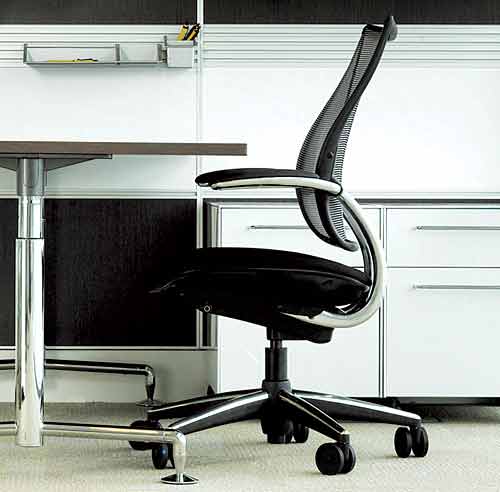 |
Photo courtesy of Staverton, London, UK
|
|
Despite good intentions, persons responsible for selecting task seating still tend to rely on the familiar criteria of chair aesthetics and price. Sometimes the decision is turned over to employees, who, presented with a choice of chairs, are asked to sit in each for a few minutes before voting. While there are benefits in involving employees in decisions, selecting a chair that will be used for thousands of hours a year on
the basis of a brief superficial "test" does not adequately serve anyone.
A first step toward understanding how chairs should function is to ask what happens when humans sit for long periods of time.
Physiology and Biomechanics of Sitting
Back pain is the single most expensive health problem for working age adults and the most challenging ailment for the medical profession. Partly because so many physical, social and psychological variables are involved, only half of lower back pain cases have identified causes. Since the use of ergonomic seating can help address at least one of these variables, it behooves designers and facility managers to become familiar with the physiology and biomechanics of seating.
 |
Task chairs in a benching application.
Photo courtesy of Staverton, London, UK |
|
The inward curve formed at the cervical region of the spine is referred to as a lordotic curvature. In the mid-back area, twelve thoracic vertebrae at the lower end of the spine curve away from the body to form a kyphotic curvature. Like the neck, the five lumbar vertebrae also form an inward, lordotic curvature. Vertebrae stack on top of each other centrally and at two lateral buttresses called facet joints. A primary goal of well-designed task chairs is to promote the spine's natural curvature.
Intervertebral discs, made up of fibrous cartilage, serve to separate the vertebrae and give them flexibility and cushioning. Through aging, inadequate nutrition and continued postural and activity stressors,
the disc cores lose their strength and flatten. This brings the vertebrae
closer together causing wear and tear on the facets and possible pain if impingement on a neighboring nerve occurs. When a person is seated, the lumbar region of the lower back changes back and forth from a
lordotic to a kyphotic curve depending on the tilt of the pelvis, which in turn affects the discs.
When the seated body is upright, thick layers of muscles surrounding the bony core of the spine contract to support it. If the person bends forward, the back muscles lengthen to keep the person from slumping over the desk, while the abdominal muscles shorten and contract. If the person is leaning forward for an extended period of time, muscles become fatigued. Plus, if the neck moves forward, the muscles at the back of the neck need to work extra hard to maintain that posture. One researcher measured the disc forces of a person seated in a task chair at a workstation and found that the upright seated posture while using a keyboard produced higher forces than all other postures and activities other than lifting a weight while seated.
Pain and injuries can occur when the body is not stabilized or
supported and muscles become fatigued as they work at maintaining posture. They can also occur if a posture is retained for a length of
time without movement. "Any fixed posture, no matter how closely it approaches the optimal, will generate muscle fatigue," says Marvin Dainoff, Ph.D., Director of the Ergonomic Research Center at Miami University of Ohio. "Therefore, it is important to build in flexibility to allow operators to shift positions easily." Movement provides nourishment for the spine, keeps the joints lubricated and flexible, improves circulation and removes waste products from the muscles.
 |
Disc pressure in the spine varies with the different seated postures assumed during
a typical workday. As shown, the spine sustains far less pressure when reclined,
which translates into more comfort and less risk of injury. |
|
Why Do We Sit?
As Professor Alan Hedge, Ph.D., director, Human Factors and Ergonomics Laboratory, Cornell University, points out, sitting has become a way of life for many Americans. "We sit in cars, buses, trains or planes when we travel; we sit to eat meals; we sit and watch TV; we sit in classrooms; and, of course, we sit most of the day at work. For many activities, we could stand just as easily as sit. For example, we could stand to watch TV, and stand in front of a desk all day as in Dickens' time. We sit for very good reasons."
The first, he says, is that sitting uses about 20 percent less energy compared with standing to do the same work, so comfortable sitting helps to relieve fatigue. Another reason, he suggests, is that sitting gives us greater postural stability for performing fine manipulative tasks such as writing. And third, sitting helps to reduce the strain on
the back muscles and on the intervertebral discs of the lumbar spine,
providing that people sit back in a supported posture.
|
|
Typing at a keyboard or laptop on a worksurface is how many computer users spend their workday-not being supported by their chair. Unfortunately, this all-too-common posture, over time, can create neck, shoulder, upper back and lower back problems.
Photos courtesy of Humanscale |
Using an adjustable keyboard support puts the hands and wrists in a neutral posture for typing, allows the head and shoulders to be centered above the torso and lets the user take advantage
of the support provided by the
backrest of the chair. All of this increases working comfort and
reduces the risk of injury. |
|
Analyzing the "Right" Position
Much of the seating literature of the 1970s and 1980s illustrated the "correct" seated position of the office worker-usually a woman typist or secretary sitting bolt upright, knees and feet together, with the angle between torso and thighs at 90 degrees. But observations of astronauts and underwater workers found evidence contrary to what was thought "correct." A recent study presented by Waseem Amir Bashir, MBChB, of the University of Alberta Hospital, Canada, at a conference of the Radiological Society of North America, reported that a 135-degree body-thigh sitting posture is a better biomechanical sitting position than a 90-degree posture, which most people consider normal. Using a new form of tissue scanning magnetic resonance imaging technology, researchers scanned volunteers who sat three different ways: slouching, or hunched forward; upright in a 90-degree position; and "relaxed," leaning back 135 degrees with feet on the floor. They found that the 90-degree position could, over time, lead to degenerative disc disease. The healthiest work position was found to be 135 degrees.
Quite simply, the more work that can be performed while reclining, the more the body's weight will be distributed to the backrest of the chair, and the less pressure the spine will have to endure.
One study by a chair manufacturer recorded office workers'
postures over the course of a day. Despite the known benefits of reclined postures, the workers leaned forward for approximately half the time and reclined for less than a tenth of the time. This suggests that either the workstation was not arranged to accommodate computer work
during recline-often the lack of a proper keyboard and mouse support promotes unhealthy positions-the chair did not support a reclined posture, or possibly, that reclining was not part of the culture of that particular office. Considering that a reclined posture relieves spinal and muscle stress, this data helps explain why back pain is so prevalent today.
Playing a significant part in these results, no doubt, is the fact that most chairs are not properly adjusted for the individual. In a recent study, one manufacturer found that nearly two-thirds of workers in an office made no adjustments to their chair, even though they knew they could. In another study, less than 2 percent of the subjects in a laboratory setting were able to identify the purpose of the back tension adjustment knob on a variety of chairs. When a chair isn't adjusted properly, it can create health problems, as people will adjust their bodies to fit the chair instead of the other way around.
Material Choices |
Responding to the growing market for ergonomic seating and informed by research that investigated the amount of body weight supported by
the seat pan, chair manufacturers have focused on developing materials that will better distribute body weight over the course of a workday.
A 2005 study by Carlo J. De Luca, Ph.D., a neuromuscular researcher, investigated the benefits of a proprietary gel long used in bicycle seats. He found that a gel seat cushion reduced the activity of some back
muscles up to 28 percent by improving pressure displacement across three critical dimensions: front to back, side to side, and up and down. This gel is now being utilized in some office chair seat cushions for maximum weight distribution and comfort.
Another innovation in chair materials is the choice of mesh for seats. Driven by aesthetic trends, according to research by Martin G. Helendar, Ph.D., and Lijian Zhang, Ph.D., in 2001, many organizations choose mesh rather than the traditional foam or gel. One reason is the claim that mesh is more breathable. In a 2005 study, however, Dr. Alan Hedge, Ph.D., found that there is no correlation between the insulation value of different seat cushion materials and thermal comfort. Clothing appears to have a much greater impact on thermal comfort than chair material, especially in
temperature controlled office environments.
Although there is currently little evidence to support the use of mesh as a seating surface, recent research has shown that certain mesh applications can achieve adequate lumbar support. A 2006 Cornell University study conducted by Anshu Agarwal, MS, and Hedge found that a three-panel mesh backrest provides better lumbar support than traditional
single-panel designs.
|
Gel cushions distribute body weight better than foam cushions.
Photo courtesy of Humanscale |
|
|
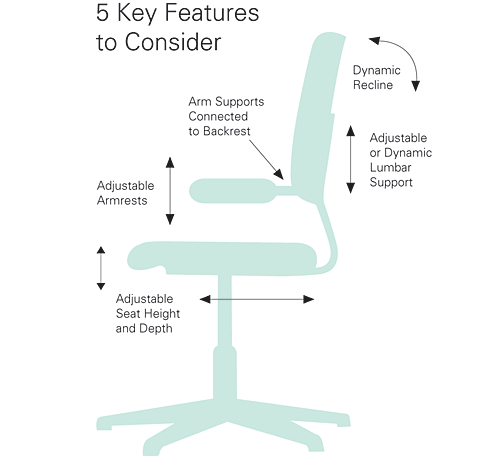
Ergonomic Chair Criteria |
Basic Features
The following are the must-have features every task chair should offer for basic sitting comfort and health.
Adjustable Seat Height
Task chairs adjusted to a proper height help to evenly distribute body weight and allow for a healthy knee angle of at least 90 degrees with feet firmly planted on the floor. The height adjustability control should be easy to access while seated in the chair.
Capability to Recline
Research has found that for optimal comfort and minimal stress on the intervertebral discs, users should work in reclined postures. The ability of the chair to provide supported recline is therefore critical.
Adjustable Lumbar Support
Lumbar requirements vary widely among individuals, so adjustable lumbar support is important in reducing stress on the back and upper body that can lead to discomfort and possible injury.
Adjustable Armrests
Armrests must be adjustable to reduce muscle loading and accommodate a variety of tasks. For instance, the ability to lower the arms below thigh level is critical for proper keyboarding postures. Sufficient padding is also an important feature.
Arm Supports that Connect to the Backrest
Armrests that are attached to the backrest of the chair-not the bottom of the seat pan-will move with users so they are optimally positioned while reclining or upright.
Adjustable Seat Pan
A frequent requirement for users of shorter stature, adjustable seat pans can eliminate contact stress on the backs of the legs and encourage use of the backrest.
Features to Avoid
Manual Recline Tension
Cumbersome spring tension knobs are seldom used, leaving chairs incorrectly adjusted and users in vulnerable work postures.
Recline Locks or Limiters
Recline locks and limiters restrict movement. Users should be able to move freely in their task chairs.
Mesh Seating Surfaces
Despite their popularity, mesh seat pans do not distribute weight as well as contoured foam or gel cushions and are therefore not preferred for task work. Research also shows no correlation between mesh seats and thermal comfort.
High-Performance Features
High-performance options are found most often on more expensive models but are worthwhile investments for maximum ergonomic benefit.
Dynamic Weight-Sensitive Recline
A sufficiently tensioned backrest that enables spontaneous recline and encourages regular, natural movement aids in maintaining long-term comfort and reducing spinal pressure. Users are more likely to work in healthy reclined positions when cumbersome knobs are not involved.
Dynamic Lumbar Support
Chairs that automatically adjust to the unique needs of each individual's body ensure adequate support.
Synchronously Adjustable Armrests
Armrests that adjust in tandem prevent possible discomfort that could result from uneven arm positioning.
Gel Seat Cushions
Gel-topped seat cushions displace weight and reduce contact stress more effectively than foam-only cushions for more comfortable long-term sitting.
Dynamic Headrest
Headrests offer added support in reclined positions to reduce upper body muscle loading. Position-sensitive headrests that move into place during recline, and out of the way when upright, are preferred.
|
|
The Complex Role of Today's
Task Chair |
- Supports the dynamic positions of sitting, including reclined postures
- Supports the lower back
- Is adjustable and able to fit different body sizes
- Provides both cushioning and support where it contacts the body
- Designed to support environmental sustainability
- Has aesthetic appeal
- Requires minimal training
|
|
Seating as a Dynamic Activity
Because sitting should be a dynamic activity, the office task chair also needs to be dynamic to support the user's many macro and micro movements throughout the day. According to the U.S. Department of Labor Occupational Safety & Health Administration (OSHA, www.osha.gov), "A chair that is well-designed and appropriately adjusted is an essential element of a safe and productive computer workstation. A good chair provides necessary support to the back, legs, buttocks, and arms, while reducing exposures to awkward postures, contact stress, and forceful exertions. [Dynamic] adjustability ensures a better fit for the user, provides adequate support in a variety of sitting postures, and allows variability of sitting positions throughout the workday."
But supporting the user is not sufficient. The chair must support the user in the context of working, while he or she is doing different tasks such as reading documents, viewing the monitor, writing by hand or keying. Leaning back in the chair may provide optimal comfort, but it may not be possible to do if the other components such as the keyboard, mouse and monitor are not ergonomically integrated into the workstation. The office chair must be viewed as part of the workstation
environment in a holistic context.
Galen Cranz, author of The Chair: Rethinking culture, body, and design, published in 1998, earned applause for her review of the chair in history, but provoked considerable criticism over her views of the chair as an ergonomic object. "Insofar as the chair stabilizes posture, it contributes actively and directly to disorders of the eye, back and wrist," she writes. "People cannot take advantage of ergonomic chairs, with some capacity for movement built in, because their eyes and hands become entrained with the keyboard and screen they are
working on. In this case we cannot really blame the chair-it is simply part of an integrated complex of chair-keyboard-person-screen, which together forms a new machine."
Cranz's conclusions regarding the computer workstation as a 21st century version of Taylor's scientific management are certainly arguable. But her point that the rest of the workstation impacts seated posture as much as the chair itself is telling. Employees may have the best chairs in the world, but if they have to lean forward to use the
keyboard or see the monitor, they simply won't be taking advantage
of their chairs.
Recognizing the critical need for a holistic approach to the workplace, the Cornell Human Factors and Ergonomics Research Group (www.ergo.human.cornell.edu) has developed a Performance Oriented Ergonomic Checklist For Computer (VDT) Workstations. According to Hedge, the most important things for creating a healthy workplace posture are a good ergonomic chair, optimal keyboard and mouse
position, and optimal monitor and document position. "Other furniture items, such as overhead storage, pedestal storage, work surface area and work surface finish, which constitute the bulk of the costs per
workstation, are almost irrelevant from an ergonomic standpoint," he says. "Consequently, companies can readily cut furniture costs by
minimizing the less essential items and reallocating funds to improving the immediate workspace of the seated worker, which is the micro-environment that actually affects their health and performance."
Seating Adjustments for All Sizes
Since people come in all shapes and sizes, one major challenge is identifying a chair that will fit most people comfortably. Manufacturers
generally design chairs to fit the 5th percentile of women to the 95th percentile of men, which theoretically covers 90 percent of the population. This range is overly optimistic for several reasons according to one manufacturer. First, most of the data collected for anthropometric studies come from military populations, which include fewer very large and very small people-and no people with disabilities-compared with the general population. That data also focuses on skeletal dimensions, says Hedge, to the exclusion of soft tissue contours. Second, dimensions may fall below the minimum or above the maximum
percentile for different people for each chair component (seat height,
seat depth, lumbar support, armrest height, etc.). This means that more
than five percent of women and five percent of men may find at least one chair component that doesn't quite fit.
The Experience of Specifying
Task Chairs |
Whether the client is a Fortune 500 corporation or an architectural firm, selecting the "right" chair is critical. Equally critical is the process undertaken by designers and facility managers to not only select that right chair, but to pre-select a number of right chairs so that clients are presented with a choice.
Brian Berry, AIA, senior associate and design director of Gensler's Wall Street office in New York City, works with clients in the media, fashion and financial sectors. "For those clients who have pre-existing chair standards, we begin the process by evaluating what they currently have and making recommendations, possibly to improve or modernize their standards. Most clients today are interested in ergonomics, durability and obviously, cost, which is always a huge factor-especially for larger projects.
"We develop a series of five or six chair images which we will bring in and talk to the client about why we feel they are appropriate. Sometimes they want to see all of them, but typically we narrow the field down. I prefer to have the vendor's representative come to the first meeting to demonstrate the different features because every chair is different. At Gensler we have a great knowledge of chairs and the manufacturers who are reliable and have provided chairs over time that are durable. We have a full time library staff that keeps track of all the new chairs and what's good and bad out there. If a chair has had a problem on one of our
projects around the country, we will know."
"Our bias is to specify chairs that offer key manual adjustments combined with automatic adjustability features," says Joe Connell, principal, The Environments Group, Chicago, IL, whose interior design firm does mostly corporate workplace projects. "There are a lot of task chairs out there and most of them offer, initially, good comfort, but how does your body feel at the end of the day? That's the real question.
"The more expensive chairs last longer and are field-repairable. We don't like the idea of a client throwing away a chair when it breaks and buying a new one. We look at life after the chair is no longer in use.
Can it be easily broken down and recycled? We want no vinyl, the fewer
plastics the better. Polished aluminum is better than chrome on steel because it is easily recycled." If someone has an injury, Connell may suggest an ergonomic consultant so that the person may make his or own choices. This results in few complaints later, he adds.
Many clients ask employees to vote on their chair preferences. Ideally, workers should try out different chairs at their workstations, sitting on each for at least a week. "Usually the client will keep the samples for a week or so and test-drive them," says Berry. "I'd love for people to test the chairs, get up and down, move around, be on the phone, be on the computer, do the different things a person might do. That's the best thing for people who are in the office all day."
|
|
Creating a Global Standard
for the Office Chair |
In need of a global standard for the many thousands of task chairs used by employees around the world, Kim Sutherland, ergonomics program manager in the health and safety department of a high-tech Fortune 500 corporation, undertook an extensive process. "We identified all the countries we were in and gathered anthropometric data for each to make sure we were recognizing how tall and how small people might be." Using BIFMA G1-2002, as well as other relevant country specific guidelines, she established a lengthy list of international ergonomic criteria for chairs to adjust from the fifth percentile female to the 95th percentile male. These were: seat height, depth and width; seat pan angle; backrest height and width; lumbar support height; the angle between the seat and the back; armrest height and length; the inside distance between the armrests; and ease of operation so that all adjustments could be made with the end user sitting in the chair.
After an RFP yielded nine chairs, Sutherland, who is an engineer and physical therapist, elicited user experience by asking employees to evaluate the chairs according to a checklist modeled after the Cornell Ergonomic Seating Evaluation Form (www.ergo.human.cornell.edu). The checklist included questions about the ability to easily adjust the chair, ability
to fit the particular individual, comfort and perceived aesthetics. The team also analyzed each chair according to procurement criteria such
as price, warranty and service in the different countries where the
company has offices.
"We first thought we wanted one chair to meet uses around the globe, but there are sites where aesthetics demand one chair over another. So
we created a list of chairs that qualified for our criteria and ranked them. Interestingly, the chair that was top in ergonomic, procurement and end user choice happened to be the same chair."
Established some 18 months ago, the chair global standard has been
very successful, reports Sutherland. "People are extremely happy. The chair selection process in all countries has become much easier. We do not get complaints and in many cases receive praise. The ability to make a chair fit has been much easier because end users can do it themselves. There are far fewer requests for interactions with the ergonomics department."
|
|
Manufacturers have responded by providing a multitude of mechanisms for adjusting chair dimensions and other components. New models have weight recognition technology that dynamically adjusts backrest resistance to perfectly support each user.
Some adjustments, such as chair height, are obviously the responsibility of the user. But others are best accomplished through automatic mechanisms in order to avoid injury and restriction of movement. Locks and manual recline tension devices fall into this category. Superior ergonomic chairs on the market have automatic and dynamic recline adjustments that accommodate both the 100-pound woman and the 250-pound man, thus allowing spontaneous movement and continuous support for users when they recline.
Another example of the advantages of dynamic adjustability over fixed or manual adjustability is the headrest. Fixed or manually adjustable headrests are either in the way when they are not needed or not in place when they are. Headrests that dynamically adjust to provide proper support during recline are preferred.
Knowledge of the different features of chair construction is also important in understanding the implications of adjustability. Armrests that are connected to the seat, for instance, may cause shoulder extension during recline, while armrests connected to the backrest will move with the body when the user reclines and provide continuous support.
 |
Armrests connected to the backrest move with the user for better support during recline than armrests connected to the seat. |
|
Sustainability and LEED Points
Most of the major chair manufacturers are incorporating principles of sustainability into their products and manufacturing processes. Using life cycle concepts, they are analyzing each production step, material origin and end use, transportation and packaging.
Materials and Components
Environmentally preferred products weigh less and have fewer parts (one manufacturer's task chair weighs 27 pounds and contains 129 parts; another manufacturer's chair weighs 78 pounds and has more than twice as many parts), thus requiring fewer production processes and less material to source, manufacture, transport and dispose of or recycle.
Recycled and Recyclable Content
Data on pre-consumer and post-consumer materials in products should be available from manufacturers. This will include the recyclable content of the product plus the recyclability of materials at its end-of-use. Aluminum is a favored choice of material because it can be infinitely recycled. Moreover, recyclers are paid a premium for aluminum scrap, which helps ensure that aluminum products will get recycled. Some chairs are made predominantly of 100 percent recycled aluminum which can be 100 percent recycled at end-of-use.
Low Emissions
Manufacturers are working toward the elimination of off-gassing adhesives and finishes. Two avenues of compliance are now available under LEED-CI Indoor Air Quality: Greenguard Certification and BIFMA M7.1-2005 and BIFMA X7.1-2005 Standards. In July 2006, the U.S. Green Building Council (USGBC) approved the rigorous BIFMA Furniture Emissions Standards as an alternative (named Option C) for achieving LEED-CI EQ 4.5 credit for low-emitting systems furniture and seating products. Before that date, Greenguard Certification was required for Options A and B.
BIFMA explains that emission levels are measured by unpacking new furniture product(s) and placing the product into a clean test chamber under controlled conditions. After a period of time has passed, samples of air from the chamber are taken and analyzed to measure the concentration of emissions from the furniture. The chamber test results are then used to estimate the impact of furniture emissions on building indoor air quality using a modeled office environment.
An Ergonomic Computer
Workstation |
- The chair should have a dynamic back so users can easily work in
various reclined postures
- The monitor should be mounted on a height and depth adjustable arm
- The top of the monitor casing should be 2"- 3" (5-8 cm) above the
eye level of the user
- The user should sit at arm's length from the monitor
- An optical glass anti-glare filter should be used if there is glare on
the screen
- The monitor and keyboard should be centered in front of the user
- The workstation should be supplied with a negative tilt keyboard tray
with attached mouse platform
- A task light is necessary for properly illuminating reading materials
- A stable footrest should be provided if the user's feet cannot rest
on the floor
- A document holder should be supplied and placed ideally, in line with
the computer screen
- The work surface and keyboard should be stable
|
|
Maintenance and Upgrades
A significant factor of sustainability is long-life design and minimizing waste when chairs are upgraded or maintained. Adopting a modular approach, one manufacturer has designed cushions that can be replaced or restored by simply removing four screws. Color schemes can be changed with far less waste than if the entire chair has to be replaced. In addition to simplifying maintenance, modular components have the advantage of being swapped out as needed to extend the product's life.
Innovation and Design
This is one LEED category often neglected by designers, who are
concentrating on reducing energy and water usage. Task chairs, as part
of a comprehensive ergonomics program, which includes appropriate
tools and training for employees, can possibly help add a LEED point. The newly renovated U.S. Green Building Council LEED platinum
certified headquarters earned one such point by providing both ergonomic products and training to ensure that all employees are equipped with tools and knowledge they need to avoid injury.
Overall, chairs can help a project earn points toward LEED-CI Certification in the following areas:
Credit 4.1 (1 Point) - Recycled Content (10 percent)
Credit 4.2 (1 Point) - Recycled Content (20 percent)
Credit 4.5 (1 Point) - Low-emitting Materials (Greenguard Certified
and BIFMA M7.1-2005 and BIFMA X7.1-2005 Standards)
Credit 5.1 (1 Point) - Regionally manufactured within 500 miles
Credit 1.1 − 1.4 (1 to 4 Points) - Innovation and Design (part of a
comprehensive ergonomics program)
Karin Tetlow writes frequently about architecture and construction.
|
Humanscale is the premier designer and manufacturer of high-performance ergonomic products for a more comfortable workplace. Our innovative and award-winning solutions - including seating, keyboard supports, monitor arms, task lighting and more - are based on the belief that if a design solves a problem as simply and elegantly as possible, the resulting form will be honest and timeless. For more information about Humanscale, visitwww.humanscale.com |
|