Photo courtesy of halbergman/E+ via Getty Images
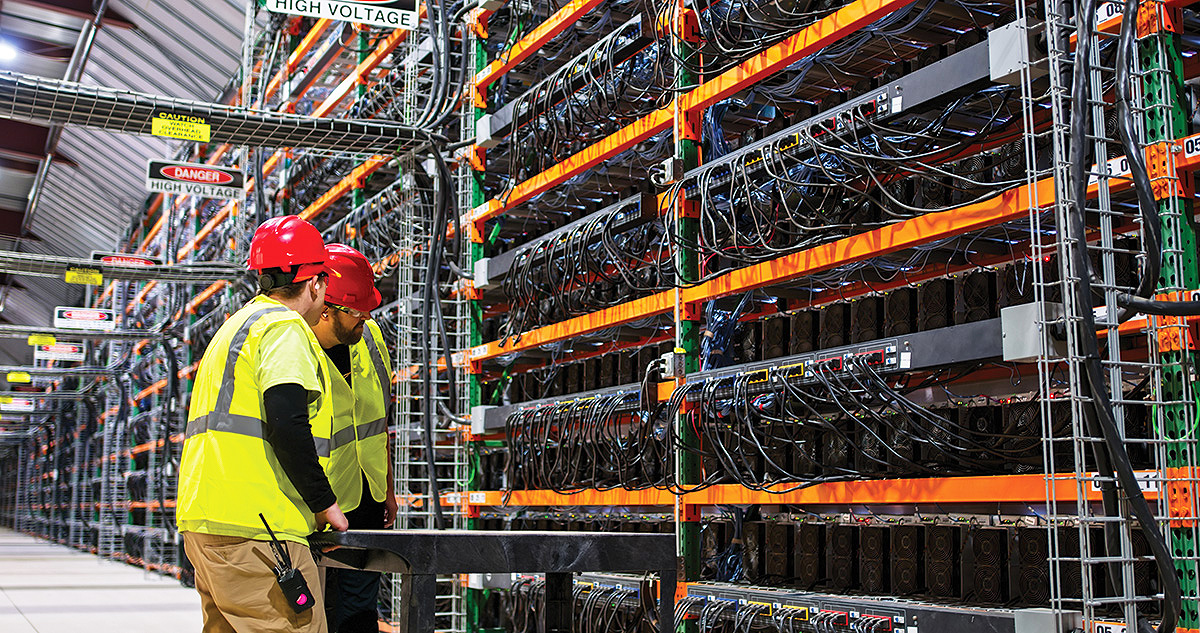
To maintain the critical functionality of data centers, both the infrastructure and the people who work in them must be protected.
The importance of data centers to a functioning society can hardly be overemphasized. Every text, email, phone call, online order, online banking transaction, medical records access, artificial intelligence interaction, and more depend on the data stored in these buildings. Architects, engineers, and other specifiers are tasked with designing buildings that house the servers that keep these key functions going around the clock, as well as protecting the personnel who work in these buildings. Even an hour of downtime for repairs or damage has massive financial and human consequences.
This course discusses designs for fire and environmental safety, durability, and code compliance in data centers, along with components that safeguard occupants and keep the centers operational. Fire-rated expansion joints, durable wall protection, and compliant signage are examined as methods to safeguard occupants and building operations. The stakes of keeping the building functioning could not be higher.
Data Centers as Critical Infrastructure and Occupied Workplaces
Data centers are suddenly everywhere in the news. Much of the attention focuses on artificial intelligence, but AI is only one piece of a much larger story. Nearly every digital activity relies on physical servers housed in buildings known as data centers. These facilities quietly power the modern world. Without them, the systems that support communication, commerce, healthcare, and government simply would not function.
While this course focuses on design strategies to protect people and critical infrastructure, let’s first fully grasp the importance of data centers to modern society:
- Large companies store their data, enabling email, collaborative applications, databases, and various types of digital services, without which organizations would be unable to operate, while also providing scalable platforms that support entrepreneurs and small businesses in reaching customers and managing operations more efficiently.
- Banks, payment channels, and stock exchanges need to quickly and reliably process transactions each day, every day, around the world. According to the World Payments Report 2026 by the Capgemini Research Institute, global payment systems processed more than 1.4 trillion non-cash transactions in 2023, with volumes projected to exceed 2.8 trillion by 2028 and approach 3.5 trillion by the end of the decade.
- Hospitals, outpatient clinics, and doctors’ offices store electronic health records for patients and run telehealth applications and electronic imaging systems, all of which must be accessible 24 hours a day. Lack of access could create life-or-death scenarios. Data centers and advanced computing technologies are also supporting surgical planning and procedures, helping reduce risk and improve outcomes.
- Telecommunications providers use data center facilities to support mobile networks, messaging services, and internet routing.
- Entertainment platforms rely on data centers to deliver streaming video, music, cloud gaming, and social media services to millions of users at the same time.
- Artificial Intelligence applications require large computing clusters, which use an incredible amount of electricity and generate tremendous amounts of heat.
What Goes on Inside a Data Center?

Photo courtesy of Kobus Louw/E+ via Getty Images
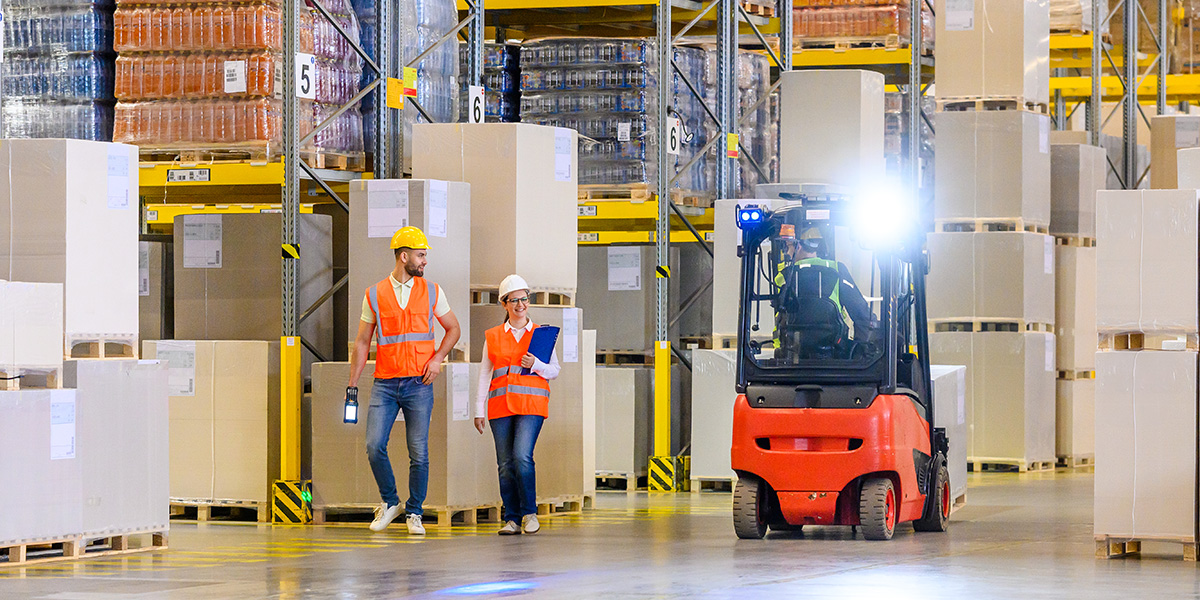
Along with sensitive equipment, data centers are populated with technicians, facility engineers, security personnel, vendors, inspectors, auditors, and others.
A common misperception is that data centers are completely filled with machines and have no people. However, data center facilities have personnel on-site 24/7 on rotating schedules.
Some examples of typical personnel roles found in a data center facility include:
- Operations technicians are responsible for monitoring the servers/network systems (throughout the entire facility).
- Facilities engineers who monitor and maintain the computer hardware’s power and cooling infrastructure, along with its backup systems.
- Security personnel, who monitor personnel access to the data center facility, through the use of surveillance cameras, security badges, etc.
- IT vendors and contractors installing and maintaining equipment and all related duties.
- Inspectors and auditors, for the purpose of verifying the data center’s security and safety compliance.
Because the infrastructure of equipment and machinery is continually changed out, updated, and/or serviced, individuals frequently move throughout the walkways of data center facilities, using carts, tools, and/or hardware. While individual data center rooms are generally tightly controlled, the building as a whole remains open to regular access and movement of equipment by personnel throughout most of each day (and all night).
Why This Matters for Building Designers
Because data centers support services critical to modern life, the buildings themselves require an extraordinarily rigorous level of performance. The term “uptime” refers to a data center’s ability to operate at a high level of availability for nearly all of its functioning hours. High reliability is typically expressed as a percentage, such as 99.999 percent (often called five-nines), which allows for only 5.26 planned or unplanned minutes of downtime per year. The facility’s design has a major role in the likelihood of achieving a five-nines goal.
Architectural systems that help ensure that the facility can protect occupants and increase uptime include fire protection, wall protection, and compliant signage. This course will focus on these systems.
Environmental Safety
Environmental conditions and fire risks are closely related, as both can affect occupant safety and building performance. While the main purpose of data centers is to house and protect equipment, designing for the health and well-being of the occupants deserves equal consideration. Common environmental aspects affecting human health in data centers include:
- Noise levels
- Thermal discomfort
- Indoor air quality
- Ergonomics
Noise levels inside and outside data centers come from mechanical equipment like high-capacity cooling systems, fans, electrical noise from transformers and other equipment, and from generators used for backup power.1 For workers inside the facility, the Occupational Safety and Health Administration (OSHA) requires action at 85 dBA as an 8-hour average. High noise levels cause immediate and cumulative damaging health impacts, including hearing loss, stress, tinnitus, chronic fatigue, and trouble communicating with other workers. Design strategies include thoughtful zone layouts that keep high-noise mechanical rooms away from control areas or break rooms. Variable-speed fans can ramp down during lower loads. The addition of sound-absorbing panels and acoustic barriers helps cut noise. Often, strong PPE protocols like electronic earmuffs that allow speech through help limit exposure.
Thermal discomfort is caused by the same factors that cause noise: servers pump out some serious heat, and in “hot aisles,” the temperature can rise to 100 degrees Fahrenheit. Cold aisles are the controlled supply of cool air to equipment. Hot aisles are the controlled removal of heat from equipment. Human health risks from excess heat include dehydration, heat exhaustion or stroke, foggy thinking, slower reactions, and higher odds of mistakes. OSHA does not yet have a strict indoor heat rule, but it’s likely one will develop in the future. Design remedies include built-in sensors, numerous water dispensers, wider aisles, hot and cold aisle separation, and high-efficiency cooling systems.
Indoor air quality is degraded by VOC off-gassing from hot circuit boards and cabling, fine particulates kicked up by fans, dust from outdoor air leaks or maintenance, and other sources. Effects on human health include headaches, worsened allergies or asthma, irritated eyes, irritated throat and lungs, and reduced focus. Productivity is dragged down by poor air quality. Design remedies include HEPA filtration, maintaining positive pressure, and monitors. The specification of low-emitting materials prevents toxins in the air. Specifying durable, easy-to-maintain floor and wall surfaces helps reduce dust accumulation. High-quality expansion joint covers help prevent air leakage.
Ergonomic issues arise from lifting heavy servers in tight spaces with awkward reaching and floors full of cables. This leads to musculoskeletal strain and tripping. Designers can focus on user-centered layouts with accessible racking, anti-fatigue flooring, clear cable management, and built-in lifting aids. A successfully designed data center protects both equipment and personnel. And both of those are protected by resilient fire and smoke prevention strategies.
Fire Safety
Fires are disasters in any type of building. But in data centers, the stakes are extremely high, and fire protection strategies must address both life safety and functional continuity. Because these facilities are built around dense concentrations of electrical equipment, the threat of electrical fires is significant, and once initiated, such fires can spread quickly along interconnected systems and cabling. A fire in one area of the facility could affect adjacent server halls or mechanical spaces if it spreads beyond the point of origin. For this reason, maintaining fire-rated compartmentation across structural expansion joints is an important part of protecting both occupants and critical technology infrastructure.
Active and Passive Fire Protection
There are two types of fire protection: active and passive.
Active Fire Protection: Active fire protection refers to systems that detect, warn occupants, and help control a fire once it starts. Fire detection systems—including smoke and heat detectors—identify fire conditions and activate building alarms so occupants and emergency personnel can respond quickly. Fire sprinkler systems automatically release water when heat reaches a set threshold, helping control or suppress flames. Portable fire extinguishers allow trained occupants to address small fires before they spread. Other active systems may include standpipes and fire pumps that support firefighting operations. Together, these systems detect fire, warn occupants, and help limit fire growth until responders arrive.
However, active fire protection also carries risks in data centers. Battery backup systems can burn intensely, emit noxious fumes, and are difficult to extinguish, placing occupants at risk. When sprinkler systems activate, multiple heads may discharge water across a large area, which can damage servers, electrical systems, and other expensive equipment—another reason designers work to prevent fires from spreading in the first place.
Passive Fire Protection: The function of passive fire protection is to compartmentalize a building to slow the spread of heat, fire, and smoke, thus allowing adequate time for the safe evacuation of occupants and for emergency responders to access and extinguish the fire. A secondary function is to limit damage and preserve the building, if possible, but that is a distant second. The main goal is to get everyone out alive and unharmed.
Passive fire protection products and systems include fire and smoke dampers, fire doors, and fire-rated walls and floors. A good analogy to passive fire protection in a building is the bulkheads and watertight doors on a ship, where a flood in one compartment is prevented from migrating to any adjacent spaces unless it breaches an impregnable wall. When this occurs, the amount of pressure created by fluids attempting to move from a high-pressure to a lower-pressure area is immense.
Designers recreate this concept of compartmentalizing spaces within a building to keep them segregated from each other in the event of fire. Instead of bulkheads, UL-rated assemblies such as concrete or composite horizontal decks, gypsum wall assemblies, rated shaft walls, etc., are used to protect building occupants.
Photo courtesy of halbergman/E+ via Getty Images
To maintain the critical functionality of data centers, both the infrastructure and the people who work in them must be protected.
The importance of data centers to a functioning society can hardly be overemphasized. Every text, email, phone call, online order, online banking transaction, medical records access, artificial intelligence interaction, and more depend on the data stored in these buildings. Architects, engineers, and other specifiers are tasked with designing buildings that house the servers that keep these key functions going around the clock, as well as protecting the personnel who work in these buildings. Even an hour of downtime for repairs or damage has massive financial and human consequences.
This course discusses designs for fire and environmental safety, durability, and code compliance in data centers, along with components that safeguard occupants and keep the centers operational. Fire-rated expansion joints, durable wall protection, and compliant signage are examined as methods to safeguard occupants and building operations. The stakes of keeping the building functioning could not be higher.
Data Centers as Critical Infrastructure and Occupied Workplaces
Data centers are suddenly everywhere in the news. Much of the attention focuses on artificial intelligence, but AI is only one piece of a much larger story. Nearly every digital activity relies on physical servers housed in buildings known as data centers. These facilities quietly power the modern world. Without them, the systems that support communication, commerce, healthcare, and government simply would not function.
While this course focuses on design strategies to protect people and critical infrastructure, let’s first fully grasp the importance of data centers to modern society:
- Large companies store their data, enabling email, collaborative applications, databases, and various types of digital services, without which organizations would be unable to operate, while also providing scalable platforms that support entrepreneurs and small businesses in reaching customers and managing operations more efficiently.
- Banks, payment channels, and stock exchanges need to quickly and reliably process transactions each day, every day, around the world. According to the World Payments Report 2026 by the Capgemini Research Institute, global payment systems processed more than 1.4 trillion non-cash transactions in 2023, with volumes projected to exceed 2.8 trillion by 2028 and approach 3.5 trillion by the end of the decade.
- Hospitals, outpatient clinics, and doctors’ offices store electronic health records for patients and run telehealth applications and electronic imaging systems, all of which must be accessible 24 hours a day. Lack of access could create life-or-death scenarios. Data centers and advanced computing technologies are also supporting surgical planning and procedures, helping reduce risk and improve outcomes.
- Telecommunications providers use data center facilities to support mobile networks, messaging services, and internet routing.
- Entertainment platforms rely on data centers to deliver streaming video, music, cloud gaming, and social media services to millions of users at the same time.
- Artificial Intelligence applications require large computing clusters, which use an incredible amount of electricity and generate tremendous amounts of heat.
What Goes on Inside a Data Center?
Photo courtesy of Kobus Louw/E+ via Getty Images
Along with sensitive equipment, data centers are populated with technicians, facility engineers, security personnel, vendors, inspectors, auditors, and others.
A common misperception is that data centers are completely filled with machines and have no people. However, data center facilities have personnel on-site 24/7 on rotating schedules.
Some examples of typical personnel roles found in a data center facility include:
- Operations technicians are responsible for monitoring the servers/network systems (throughout the entire facility).
- Facilities engineers who monitor and maintain the computer hardware’s power and cooling infrastructure, along with its backup systems.
- Security personnel, who monitor personnel access to the data center facility, through the use of surveillance cameras, security badges, etc.
- IT vendors and contractors installing and maintaining equipment and all related duties.
- Inspectors and auditors, for the purpose of verifying the data center’s security and safety compliance.
Because the infrastructure of equipment and machinery is continually changed out, updated, and/or serviced, individuals frequently move throughout the walkways of data center facilities, using carts, tools, and/or hardware. While individual data center rooms are generally tightly controlled, the building as a whole remains open to regular access and movement of equipment by personnel throughout most of each day (and all night).
Why This Matters for Building Designers
Because data centers support services critical to modern life, the buildings themselves require an extraordinarily rigorous level of performance. The term “uptime” refers to a data center’s ability to operate at a high level of availability for nearly all of its functioning hours. High reliability is typically expressed as a percentage, such as 99.999 percent (often called five-nines), which allows for only 5.26 planned or unplanned minutes of downtime per year. The facility’s design has a major role in the likelihood of achieving a five-nines goal.
Architectural systems that help ensure that the facility can protect occupants and increase uptime include fire protection, wall protection, and compliant signage. This course will focus on these systems.
Environmental Safety
Environmental conditions and fire risks are closely related, as both can affect occupant safety and building performance. While the main purpose of data centers is to house and protect equipment, designing for the health and well-being of the occupants deserves equal consideration. Common environmental aspects affecting human health in data centers include:
- Noise levels
- Thermal discomfort
- Indoor air quality
- Ergonomics
Noise levels inside and outside data centers come from mechanical equipment like high-capacity cooling systems, fans, electrical noise from transformers and other equipment, and from generators used for backup power.1 For workers inside the facility, the Occupational Safety and Health Administration (OSHA) requires action at 85 dBA as an 8-hour average. High noise levels cause immediate and cumulative damaging health impacts, including hearing loss, stress, tinnitus, chronic fatigue, and trouble communicating with other workers. Design strategies include thoughtful zone layouts that keep high-noise mechanical rooms away from control areas or break rooms. Variable-speed fans can ramp down during lower loads. The addition of sound-absorbing panels and acoustic barriers helps cut noise. Often, strong PPE protocols like electronic earmuffs that allow speech through help limit exposure.
Thermal discomfort is caused by the same factors that cause noise: servers pump out some serious heat, and in “hot aisles,” the temperature can rise to 100 degrees Fahrenheit. Cold aisles are the controlled supply of cool air to equipment. Hot aisles are the controlled removal of heat from equipment. Human health risks from excess heat include dehydration, heat exhaustion or stroke, foggy thinking, slower reactions, and higher odds of mistakes. OSHA does not yet have a strict indoor heat rule, but it’s likely one will develop in the future. Design remedies include built-in sensors, numerous water dispensers, wider aisles, hot and cold aisle separation, and high-efficiency cooling systems.
Indoor air quality is degraded by VOC off-gassing from hot circuit boards and cabling, fine particulates kicked up by fans, dust from outdoor air leaks or maintenance, and other sources. Effects on human health include headaches, worsened allergies or asthma, irritated eyes, irritated throat and lungs, and reduced focus. Productivity is dragged down by poor air quality. Design remedies include HEPA filtration, maintaining positive pressure, and monitors. The specification of low-emitting materials prevents toxins in the air. Specifying durable, easy-to-maintain floor and wall surfaces helps reduce dust accumulation. High-quality expansion joint covers help prevent air leakage.
Ergonomic issues arise from lifting heavy servers in tight spaces with awkward reaching and floors full of cables. This leads to musculoskeletal strain and tripping. Designers can focus on user-centered layouts with accessible racking, anti-fatigue flooring, clear cable management, and built-in lifting aids. A successfully designed data center protects both equipment and personnel. And both of those are protected by resilient fire and smoke prevention strategies.
Fire Safety
Fires are disasters in any type of building. But in data centers, the stakes are extremely high, and fire protection strategies must address both life safety and functional continuity. Because these facilities are built around dense concentrations of electrical equipment, the threat of electrical fires is significant, and once initiated, such fires can spread quickly along interconnected systems and cabling. A fire in one area of the facility could affect adjacent server halls or mechanical spaces if it spreads beyond the point of origin. For this reason, maintaining fire-rated compartmentation across structural expansion joints is an important part of protecting both occupants and critical technology infrastructure.
Active and Passive Fire Protection
There are two types of fire protection: active and passive.
Active Fire Protection: Active fire protection refers to systems that detect, warn occupants, and help control a fire once it starts. Fire detection systems—including smoke and heat detectors—identify fire conditions and activate building alarms so occupants and emergency personnel can respond quickly. Fire sprinkler systems automatically release water when heat reaches a set threshold, helping control or suppress flames. Portable fire extinguishers allow trained occupants to address small fires before they spread. Other active systems may include standpipes and fire pumps that support firefighting operations. Together, these systems detect fire, warn occupants, and help limit fire growth until responders arrive.
However, active fire protection also carries risks in data centers. Battery backup systems can burn intensely, emit noxious fumes, and are difficult to extinguish, placing occupants at risk. When sprinkler systems activate, multiple heads may discharge water across a large area, which can damage servers, electrical systems, and other expensive equipment—another reason designers work to prevent fires from spreading in the first place.
Passive Fire Protection: The function of passive fire protection is to compartmentalize a building to slow the spread of heat, fire, and smoke, thus allowing adequate time for the safe evacuation of occupants and for emergency responders to access and extinguish the fire. A secondary function is to limit damage and preserve the building, if possible, but that is a distant second. The main goal is to get everyone out alive and unharmed.
Passive fire protection products and systems include fire and smoke dampers, fire doors, and fire-rated walls and floors. A good analogy to passive fire protection in a building is the bulkheads and watertight doors on a ship, where a flood in one compartment is prevented from migrating to any adjacent spaces unless it breaches an impregnable wall. When this occurs, the amount of pressure created by fluids attempting to move from a high-pressure to a lower-pressure area is immense.
Designers recreate this concept of compartmentalizing spaces within a building to keep them segregated from each other in the event of fire. Instead of bulkheads, UL-rated assemblies such as concrete or composite horizontal decks, gypsum wall assemblies, rated shaft walls, etc., are used to protect building occupants.
Fire Barriers at Expansion Joints
When fire-rated walls or floors cross a structural expansion joint, the joint creates an intentional gap that interrupts the continuity of the fire barrier. Fire-rated expansion joint systems are used to maintain the performance of the barrier while still allowing the building to move.
We will now turn our attention to a specific form of passive fire protection: the fire barriers within expansion joints.
The Importance of Fire Barrier Systems
Fire barrier systems are specified in floor and wall joints in fire-rated locations. These are installed strategically to prevent fires from spreading floor-to-floor and room-to-room and to retain the integrity of egress routes. Locations are dictated by building codes. Fire-rated joint systems are commonly tested under UL 2079 fire-resistance standards, which include movement cycling evaluated under ASTM E1399 and ASTM E1966.
Fire and environmental safety strategies in data centers often include:
- Fire-rated barriers to limit fire and smoke spread
- Water and vapor barriers to control moisture and humidity
- Movement-capable joint systems to maintain continuity throughout building movement
- Interior materials selected for fire performance and durability
These elements work together to maintain separation between spaces and reduce the risk of system disruption.
Fire-Rated Expansion Joint Systems
Expansion joint fire barriers come in three forms:
- Compression Types: Typically for 3-inch (75 mm) or smaller expansion gap widths.
- Fire Blankets: Range from 2- to 32-inch joint widths that are required for dynamic seismic movement of the expansion joint.
- Fire-rated Foams: For 6-inch (153 mm) and smaller conditions where abuse is not likely.
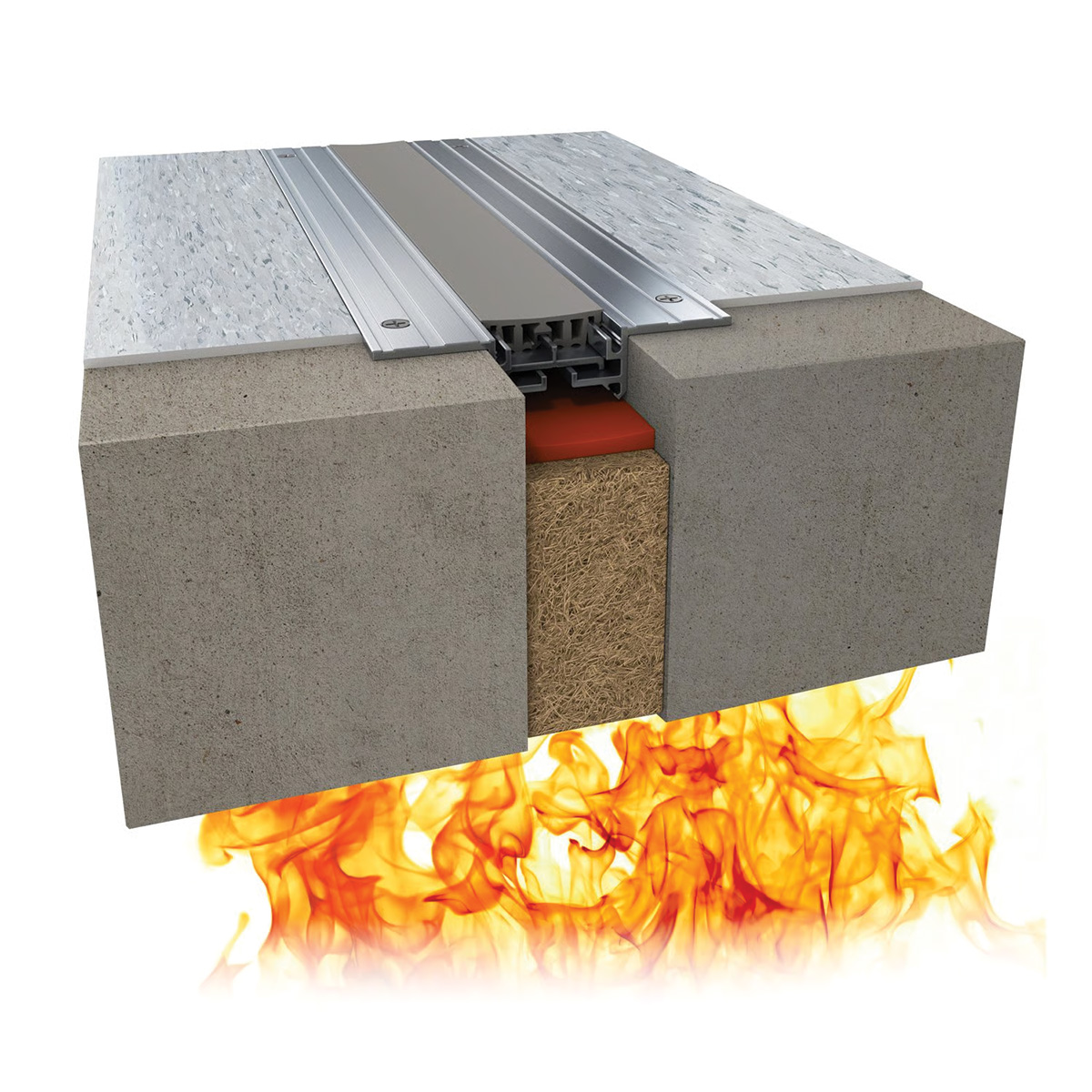
Image courtesy of Inpro
Compression system.
Compression Systems: Compression expansion joint systems are comprised of rock and mineral wool strips that are compressed into the joint opening and held in place. The system is topped with fire caulk sealant to secure the barrier and protect from water infiltration. Note that this product is commonly confused with penetrations or head-of-wall applications. However, these products do not meet active movement needs.
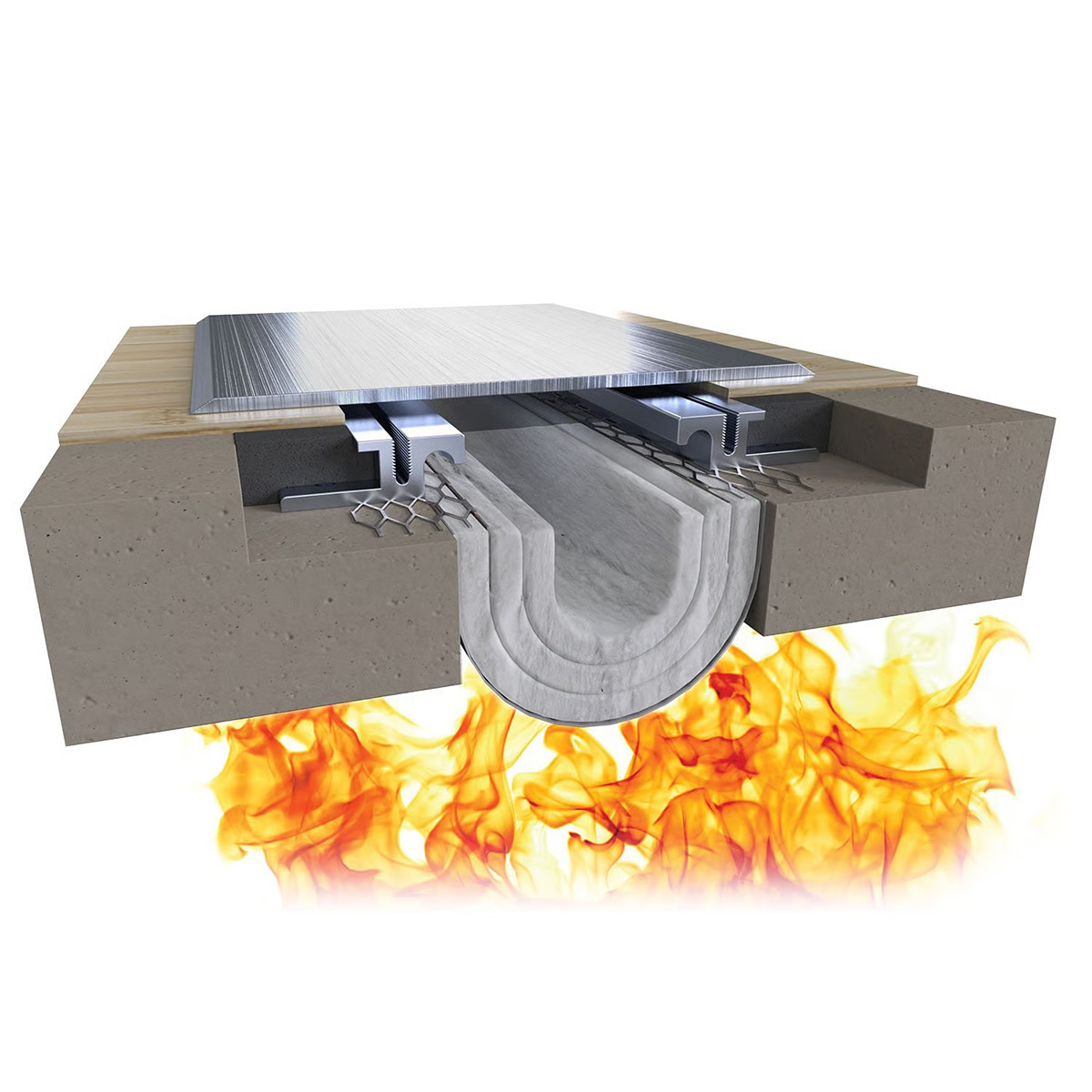
Image courtesy of Inpro
Fire blanket system.
Fire Blanket Systems: Fire blanket systems are designed for expansion joints that experience high rates of movement. These systems can accommodate a wide range of joint sizes and movement conditions. All fire blankets permit dynamic movement under seismic conditions (50% +/- expansion or contraction of the joint). Fire ratings achieving two- or three-hour resistance are available.
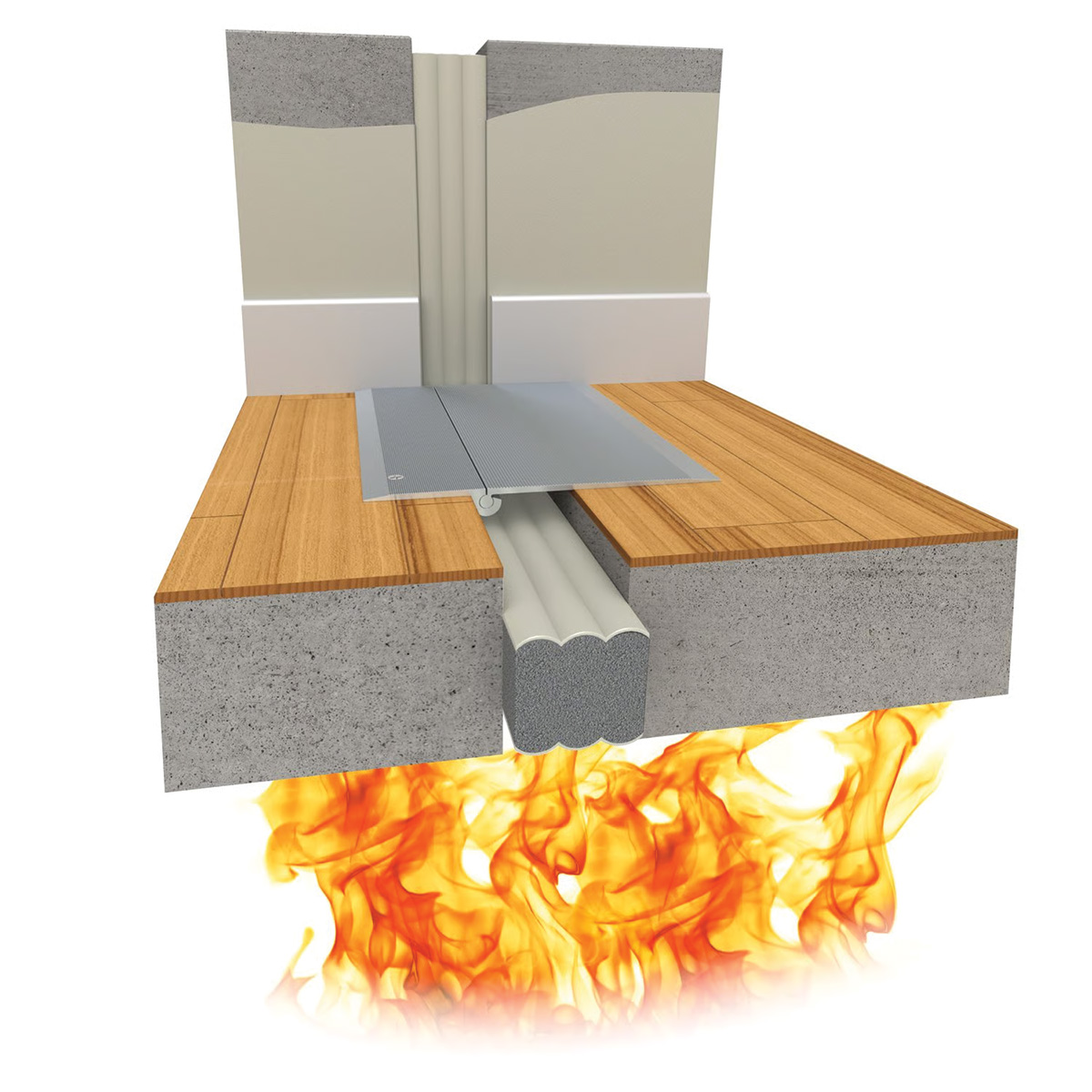
Image courtesy of Inpro
Fire-rated foam system.
Fire-rated Foam Systems: Fire-rated foams are pre-compressed foam materials comprised of open-cell polyurethane foam impregnated with fire-retardants and topped with a silicone coating. While these systems carry the highest per-foot cost point in the industry, they do provide another flexible option for tight spaces and achieve a level of acoustic dampening.
Fire-rated expansion joint systems do not operate in isolation. Their performance depends on coordination with adjacent wall assemblies, floor systems, and finishes. Gaps, transitions, and changes in materials can cause vulnerabilities if not properly detailed. For this reason, designers must consider how multiple systems interface at these locations to sustain continuity of protection.
Common Factors Affecting Expansion Joint Fire Barrier Performance
- A good substrate is critical; a fire rating is only as good as the rated construction around the barrier.
- The fire barrier is an extension of the rated construction.
- Architects should review test documents and manufacturers’ installation instructions to get a solid understanding before specifying a system for the task.
- Architects should provide detailed information for rated expansion joint conditions instead of saying “Fire Barrier as or where required.” The contractor is going to build the project based on the details provided.
In short, expansion joint fire barriers are just as important as sprinklers and extinguishers, even more so as they help to compartmentalize smoke and temperature rise. They form part of a broader system of fire and environmental controls that work together to protect both occupants and building operations. This reduces the risk of death and injury, either from the fire itself or in evacuating occupants in a fire emergency. Life safety demands attention to detail when designing, specifying, manufacturing, and installing fire-rated expansion joints.
Durability and Wall Protection in Data Centers
Interior walls in data centers often include multiple building systems, including expansion joints and ADA-compliant signage. These surfaces must also accommodate continuous maintenance activity and equipment movement throughout the facility. Because data centers operate around the clock, repairs to interior finishes can be disruptive and difficult to schedule. Standard painted drywall or gypsum board alone often isn’t sufficient in high-traffic areas. For these reasons, designers often specify durable wall protection systems that help preserve interior surfaces and reduce ongoing maintenance in high-use areas. A longer life-cycle is essential for buildouts to ensure long-lasting buildings with high-performance uptime.
Where Durable Walls Matter in High-Use Facilities
Service corridors and equipment rooms experience the greatest impact. Carts, tools, server racks, and maintenance equipment frequently move through these areas and may contact wall surfaces, corners, and base conditions. These locations often require targeted protection strategies based on traffic patterns and equipment movement, helping architects determine where added durability is most needed. To deal with these conditions, designers commonly rely on a combination of wall protection systems, including large-area cladding and targeted impact protection.
Rigid Sheet Wall Panels as a Primary Strategy
Rigid wall panels are commonly used to protect large wall surfaces in high-use areas where impacts are expected. In data centers, these systems provide a durable layer over the wall surface to help resist damage from equipment and service activity.
These panel systems are available in a range of materials, each built to different levels of impact and performance requirements:
- Stainless steel or aluminum sheet: Used in select high-impact or specialized areas where a harder surface is required due to durability, corrosion resistance, and cleanability.
- Rigid vinyl (with or without foam backing): Used for wall panels or lower-wall protection; provides cushioning against scrapes and is easy to install and clean.
- PETG or biopolymer alternative: Newer materials that deliver similar durability while providing alternative material formulations.
Stainless steel sheet is commonly used, while rigid vinyl sheet systems are selected for some applications. Once selected, rigid sheet systems are available in several configurations. Panels are also available in multiple thicknesses, giving designers the ability to match the level of protection to expected impact conditions. Installations may use individual sheets or rolled material, which can reduce seams and create a smoother wall surface along long corridors or service areas.
Components of Wall Protection Systems
Wall protection systems are a combination of coordinated components that protect different parts of the wall from impact.
- Guardrails or crash rails are installed along corridors/service routes horizontally (on the walls) to absorb the impact from all wheeled vehicles (i.e., moveable carts) prior to them impacting and damaging the wall surface in the surrounding area.
- The outside corners of the walls are reinforced with corner guards in a manner similar to crash rails because the corners will receive a higher concentration of impacts and result in damage to that outside corner of the wall.
- The wall base system protects the bottom portion of the wall where the greatest number of impacts occurs, providing a durable transition between the floor and wall finishes in order to prevent damage to the base of the wall due to rolling equipment.
These products cushion impact and protect the underlying wall while covering only part of the wall surface. Design considerations include traffic patterns, protrusion from the wall surface, and equipment movement. In high-use service areas, designers may combine full-wall cladding with targeted protection systems to address various types of impact.
Four Things Architects Should Evaluate When Specifying Wall Protection: Durable wall protection systems depend on more than the panel itself. Substrate conditions, finishing details, and installation methods all influence how well the system performs over time. When specifying wall protection for data centers and other high-use facilities, architects should evaluate a number of factors.
- The Wall Construction Behind the Protection—The wall assembly supporting the protection system affects its ability to resist impact. Common substrates include drywall, cement board, fire-rated plywood, and CMU walls. These materials provide different levels of strength and fastening support. In high-use areas such as service corridors or equipment rooms, stronger backing materials can improve the durability of the wall protection system.
- Finishing Details at Seams and Edges—Rigid sheet installations typically use trim pieces such as divider bars and top caps, or they may use color-matched caulk to finish seams. Trim can provide a defined visual edge, while caulk produces a smoother appearance with fewer projecting elements. Designers should consider installation labor and the possibility that projecting trim may snag equipment or carts moving through service areas.
- Installation Methods and Adhesives—Rigid sheet panels are commonly bonded to wall surfaces using adhesives. Roll-on adhesives may also be used as an option to simplify and speed installation. Proper adhesive selection and installation techniques help ensure full contact with the substrate and long-term attachment of the wall protection system.
- Fire Performance of Wall Protection Materials—Wall protection materials should be evaluated for their fire performance, particularly in facilities where fire safety is a major issue. Many products are tested for surface burning characteristics and may be classified as Class A, B, or C. In data centers and similar environments, specifying materials that meet Class A requirements can aid overall life safety objectives and alignment with code requirements.
Compliance and Risk Considerations in Data Centers
Data centers are required to comply with a range of codes and standards that address life safety, accessibility, and operational risk. In addition to signage requirements, designers must consider how building systems, including systems and components that support safe movement, clear egress, equipment protection, and ongoing maintenance, influence how spaces are organized, detailed, and used on a daily basis.
Data centers are often described in terms of servers, cooling systems, and power systems, but they are also workplaces where people move through the building to operate and maintain equipment. Rooms within these facilities fulfill distinct functions, including electrical distribution, cooling equipment, battery storage, and server operations. Clear identification of these spaces supports both safety measures and daily operations by helping personnel confirm they are entering the correct area before beginning work.
These considerations translate into various areas of compliance that must be addressed during design:
- Means of egress and life safety: Open exit paths, emergency lighting, and code-compliant egress widths are required to support safe evacuation in large, equipment-dense facilities.
- Fire-resistance and compartmentation: Rated walls, floors, and joint systems must maintain separation between spaces such as server halls, electrical rooms, and battery storage areas.
- Electrical and equipment safety: Clearances around panels and equipment must comply with code to allow safe access for operation and maintenance.
- Accessibility and circulation: Routes through the building must accommodate all users, including clear paths, door hardware, and maneuvering space requirements.
- Slip resistance and floor conditions: Flooring systems must reduce slip risk while permitting cable management, raised floors, and maintenance activity.
- Durability and impact protection: Wall and corner protection systems help maintain safe, compliant conditions in high-use service corridors and equipment areas.
Among these considerations, accessibility requirements—particularly those established by the Americans with Disabilities Act (ADA)—shape how spaces are identified and navigated within a building. The ADA establishes requirements for accessible signage, including provisions for people with visual impairments. Interior signage is generally addressed in two conditions: wall-mounted signs and ceiling- or projected-mounted signs. Wall-mounted signage includes permanent room identification, along with certain informational and directional signs. Ceiling- or projected-mounted signage is typically used for directional and informational purposes.
The Vast Reach of the ADA and Its Signage Requirements
ADA requirements apply across a wide range of building types. State and local government facilities must comply with ADA Standards in both new construction and alterations, covering everything from schools and hospitals to courthouses and public housing. Federal facilities fall under the Architectural Barriers Act (ABA), which follows similar accessibility requirements.
In the private sector, the ADA applies to most buildings where people interact with a business or go to work. This includes both customer-facing environments and operational facilities such as offices, warehouses, and manufacturing spaces. Data centers fall within this category and are therefore subject to ADA requirements, including those governing accessible signage.
Transportation facilities and systems are also covered, extending accessibility requirements to both stations and vehicles.
There are limited exceptions. Religious organizations and the facilities they control are not subject to ADA requirements, and certain private clubs may also be exempt depending on how they operate. Even where the ADA does not apply, state or local access codes may still govern. Residential buildings such as apartments and condominiums are instead regulated under the Fair Housing Act, which includes its own requirements for accessible signage.
Data Center Signs
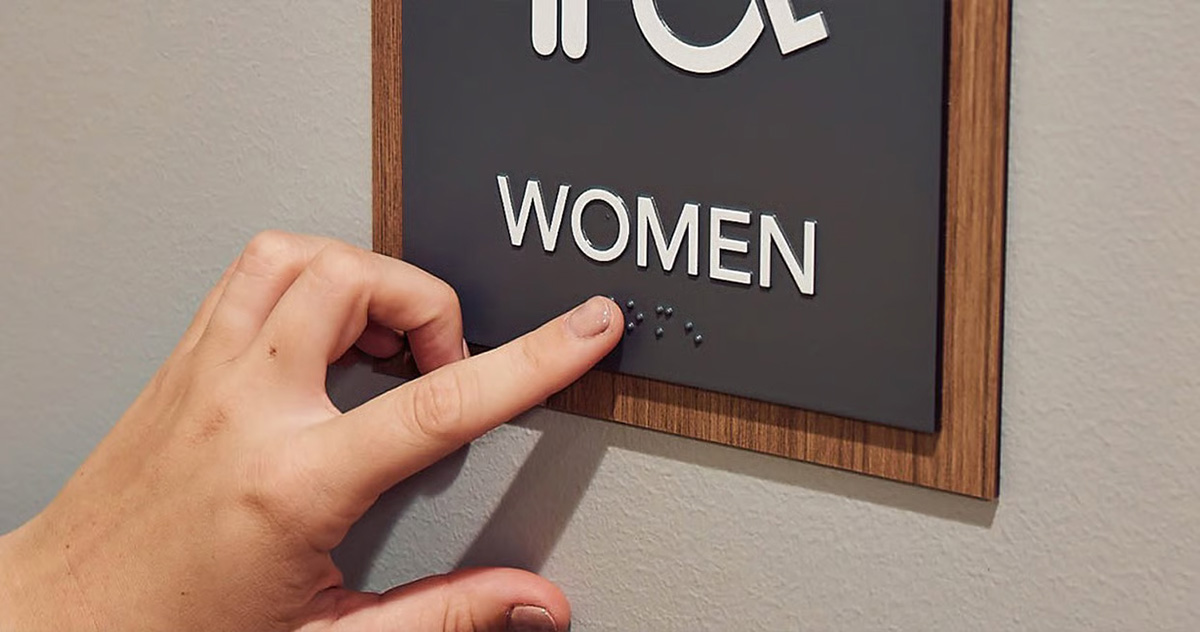
Photo courtesy of Inpro
Signs compliant with the ADA are required in data centers.
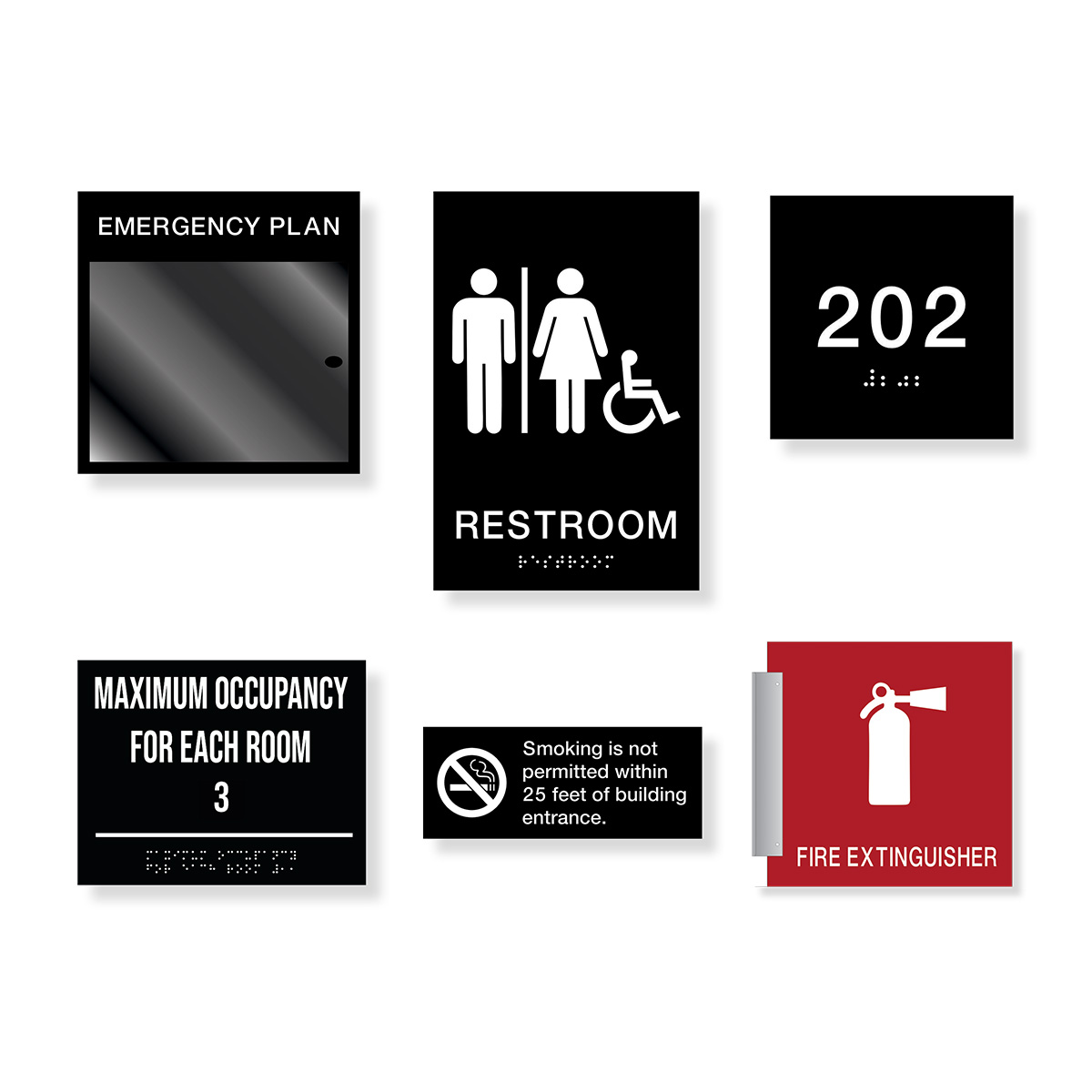
Photo courtesy of Inpro
ADA-compliant signs in data centers should be durable and integrated with wall protection.
In data centers, signs that identify a room, space, or area are required for both public access areas and all employee areas. That includes:
- Server halls
- Electrical rooms
- Battery rooms
- Cooling equipment rooms
- Storage rooms
- Stairwells
The ADA guidelines for Permanent Room Identification signs consist of three sections: sign composition, sign mounting, and sign finish and contrast.
Sign Composition: Sign composition requirements are very specific. For instance, the text must be raised from the sign face with a minimum 5/8-inch tactile character height, and a maximum 2-inch tactile character height, with a 1/32-inch minimum raised text. Height and spacing between characters should be 10 percent minimum and 35 percent maximum of the character height. Characters should be sans serif and not in italic form. There are separate specific requirements for Braille.
Sign Mounting: Sign mounting requirements state that the sign must be mounted on the latch side of the door and must be 48 inches minimum from the finished floor to
the bottom line of text or 60 inches maximum to the top line of text.
Sign Finish and Contrast: For sign finish and contrast, characters must have an eggshell, matte, or non-glare finish, and characters must contrast with the background. Under the current ADA Guidelines, the use of Light Reflectance Values (LRV) in interior signage is not required, nor are specific values specified. LRV’s are the percentage of light that is reflected from a surface.
Coordinating With Wall Protection: Because ADA signage must be mounted at specific heights and locations—typically adjacent to the latch side of doors—its placement should be coordinated with other wall-mounted systems during design. In high-use environments such as data centers, service corridors often include wall protection panels, corner guards, or crash rails to prevent damage from carts and equipment. If these systems are installed without coordination, they can interfere with required signage placement or visibility. Integrating signage layout with wall protection planning helps maintain accessibility compliance while protecting both the wall surface and the signage itself over the life of the facility.
Durability in 24/7 Environments: In facilities that operate continuously, signage must remain legible and securely mounted over long periods of use. Service corridors, equipment rooms, and support areas are often accessed by technicians, contractors, and maintenance personnel, and carts or equipment may occasionally come into contact with wall surfaces. Signs that loosen, fade, or become damaged can create compliance issues and require replacement in active areas of the building. Durable materials and secure mounting methods help ensure that identification signage remains readable and properly located throughout the life of the facility, reducing maintenance needs while maintaining accessibility requirements. Materials such as photopolymer signage can provide greater durability and vandal resistance, supporting long-term performance in high-use environments.
Conclusion
Data centers support critical services that society depends on every day. This makes building durability, life safety, and continuous operation essential design priorities. Architects must coordinate multiple systems to meet these demands. Strategies that address fire and environmental safety, durability, and overall compliance and risk mitigation shape how these facilities are designed and operated. Fire-rated expansion joint systems help maintain separation from heat, fire, and smoke. Durable wall protection reduces damage in high-use service areas and helps prevent disruptions to equipment and operations. ADA-compliant signage supports accessibility, clear identification of spaces, and effective emergency response, helping ensure that facilities remain safe for occupants, functional, and resilient.
END NOTES
https://acoustical-consultants.com/data-centers/a-guide-to-noise-control-in-data-centers
Kathy Price-Robinson writes about construction and architecture with a focus on durability and climate resiliency. www.kathyprice.com.